One of the most dynamic types of audio in any mix, meaning audio with a wide difference between the quietest and loudest, is the vocal. This comes by virtue of how vocal performances are recorded or better said delivered as the level of the recording will vary with the energy and emotion from one section of a song to the next, even line to line. As the vocal is typically the “star” of most mixes, compression is essential for controlling those vocal dynamics and keeping the vocal constantly present in the mix, regardless of the genre and vibe of the performance itself. With all of that in mind, consider these 5 compressing vocal tips for helping your vocals sound professional simply through dynamic control.
Compressing Vocal Tips
Let’s begin with the obvious, or simply pairing your vocal with the right type of compressor.
Use the Right Type of Compressor
Generally speaking, different types of audio compressors are best suited for different tasks relative to dynamic control.
For example, a VCA style compressor usually works best for creating a little glue and cohesion on busses, even the master bus.
When it comes to vocals, the best options are FET compressors as well as opto or optical compressors.
The former or FET style compressors are typically my choice as the first line of dynamic control in the signal chain. With aggressive settings dialed into its admittedly user friendly interface, you can quickly get your vocal under control so that no words are missed and it becomes much easier to set its level relative to the rest of the mix.
I like the Arturia Comp FET-76 as far as FET compressors go, but the Analog Obsession Fetish is a good free option, as well.
An optical compressor is a much more transparent or better said subtle form of compression which smooths out the vocal and is ideal both for vocals which have a lot less dynamic range naturally or because they’ve already been compressed earlier in the chain, either way thus requiring less compression.
I like the CLA-2A from Waves, but the Variety of Sound ThrillseekerLA is a good free option, as well.
Use Serial Compression
Speaking of two types of compression, serial compression is typically a good idea, especially with a moderately to severely dynamic vocal with a great difference between the quietest and loudest practical points of that recording.
Serial compression means using two compressors back to back in your signal chain.

The advantage of this is that you generally get better results spreading out the workload between two compressors with relatively lighter settings dialed in versus getting much more aggressive with one doing all the compression.
The first compressor can be used to achieve somewhere between 5-10dB in gain reduction with the higher end obviously on the loudest peaks of the vocal, and a FET compressor works well in this spot as mentioned:

This compressor will still leave some appreciable dynamics which we can then smooth out further to get that vocal under just a bit more control and keeping it up from with an optical compressor:

This smooths out the remaining peaks by another 1-2dB, maybe going as high as 3dB on the loudest remaining peaks. We’re still leaving some dynamics intact at the end of this, but the entire process yields a better sounding vocal than if we just smashed it with a single compressor.
Speaking of not smashing your vocal regardless of how many compressors you use, it helps knowing HOW to compress your vocal.
Know/Use the Best Settings
Let’s tackle the obvious – different types of audio benefit from different types of compressor setups.
When it comes to vocals, you typically want more aggressive settings dialed into your compressor’s parameters because, as I mentioned at the top, vocals are some of the most dynamic types of audio in your mix.
As such, these are the vocal compression settings I recommend on the FET (or any first) compressor:

A quick deeper dive on where to set each of your audio compressor settings for vocals:
Threshold
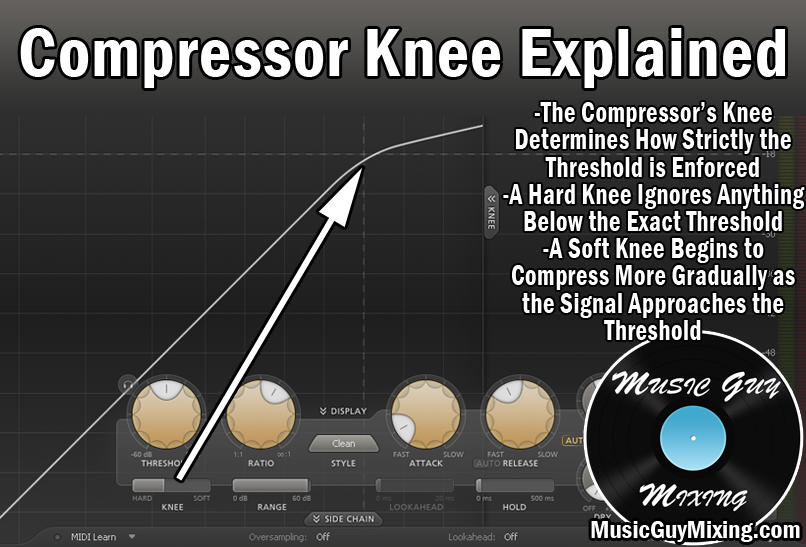
The threshold is the input level the vocal needs to reach before the compression will even engage. I typically set this roughly 10 decibels BELOW the average level. This ensures virtually the entire vocal gets compressed, albeit obviously at greater degrees at the loudest peaks.
Ratio
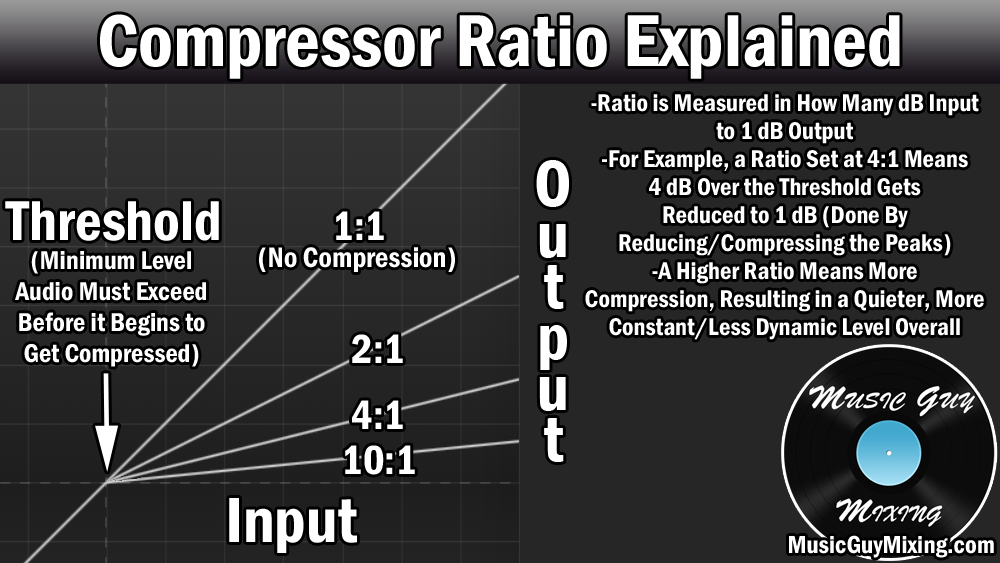
One of the nice details I alluded to regarding FET style compressors a moment ago is that they’re set up very simply, particularly with regards to the preset ratio buttons. While 4:1 is a good average ratio for a lot of types of audio, for our first line of compression via the FET (or any) compressor on a vocal, I like going a bit more aggressive with an 8:1 ratio.
This means that every 8dB which exceed the threshold, only 1dB will pass through, resulting in 7dB in gain reduction.
Between the threshold, ratio, and other settings, I typically am aiming for around that 8-10dB sweet spot in gain reduction on vocals on average at those loudest peaks.
Attack
As always, the attack on a compressor is the amount of time (typically measured in milliseconds) once the threshold is met before compression engages.
A little attack to offset the compression keeps the transients of the vocal from being sucked in to the rest of the compression. This is that initial “punch” on the vocal that you hear especially on certain consonant sounds – this helps to keep the vocal cutting through and present in the mix.
Even as little as 1ms is generally enough. 1176 compressors like the ones mentioned before have dials with number presents in place of milliseconds, so aim for the “6” spot on your vocal compressor for a relatively fast attack to still preserve the transients but get the full benefits of the compression.
Release
The release is how quickly the compression de-engages once the threshold is no longer met, so sort of the opposite of the attack. 40ms is a sweet spot for vocals, but again on a FET compressor like pictured above, “5” works well in achieving a subtle release so the listener doesn’t hear the compression disengaging.
Output
The output is simply the makeup gain. Compression by definition lowers the overall level of the vocal by bringing down those peaks. We need to compensate for that gain reduction by turning up the output dial to offset the difference.
The goal should be making the level going out match the level of the vocal going in to help maintain gain staging and all of its benefits.
By the way, you can check out my best compression settings in snapshot form for every type of instrument or audio in your mix by grabbing my free compression cheat sheet.
Split a Track by Dynamics
Another of these very important compression vocal tips to not forget is to split up a vocal in accordance to its dynamics and average level.
For instance, this vocal track was all recorded as a single take:

The area where the level expands is when that chorus hits. The peaks are substantially louder than the preceding part.
With that in mind, we’d get much better results by putting the chorus on its own track despite the fact that it was recorded as part of the same track and even take.
This in turn allows us to dial in a different and more apt threshold for that section versus the rest of the parts of the vocal, yielding a better result from the compressor.
This obviously isn’t limited to vocals – any time you’ve got a single take which has significant changes in the level which are clearly defined (verse, prechorus, chorus), you should think about splitting them up by that difference and giving each part its own track to get better tailored results for the compressor.
Parallel Compress Your Vocals
One last tip for compressing vocals better is to parallel compress your vocals.
Parallel compression is the practice of taking a duplicate version of your audio and absolutely crushing it with aggressive compression settings.
This is demonstrated in my suggested parallel vocal compression settings, particularly in the ratio:

As you can see, we’re going for a lot more gain reduction in this setup, basically ensuring the entire vocal (the duplicate) is flat in terms of level; it plays at the same volume regardless of how quiet or loud that vocal initially was from beat to beat.
When blended in beneath our original, normally compressed vocal so that you can barely hear or better said “feel” its impact, the net result is that you’re giving that vocal more energy and presence.
Set up your parallel compressor as an aux send and apply it to multiple vocals or other tracks in your mix for a greater benefit.
Compression is one of the most important elements of vocal processing, but it’s just one of many moves you should make. Check out my complete vocal chain for step by step, plugin by plugin recommendations on getting your vocal sounding its absolute, professional quality best.