
When your bass is getting lost, isn’t consistent, or just isn’t sitting right, it’s typically down to an issue which can be corrected through bass EQ and compression. With that in mind, I thought I’d put together a comprehensive guide on applying the two most important types of processing to one of the most important instruments in any mix.
Bass EQ and Compression
In the eternal question of EQ or compression first, I recommend beginning with EQ so you can cut out the bad stuff that you don’t want affected by compression.
Bass EQ
Like any EQ, bass guitar EQ is all about cleaning up your tone by getting rid of what’s not working and keeping what is.
This includes high passing (yes high passing) your bass as well as creating a complimentary dynamic cut to help it gel better with the kick:
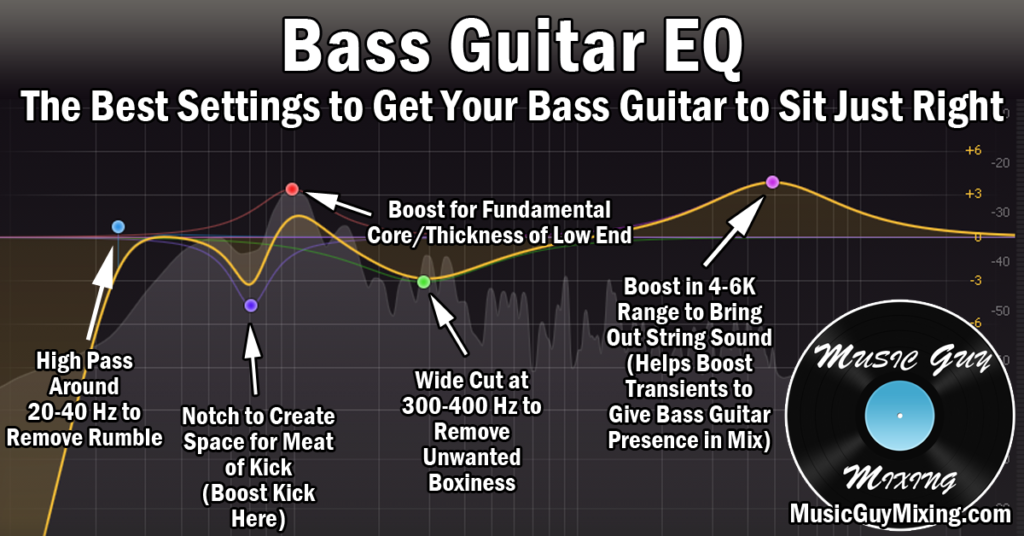
High Pass Around 40Hz
It may seem counterproductive to cut the lowest frequencies on an instrument which is all about low frequencies, but the truth is the bass can benefit from a high pass filter just like virtually every track in your mix.
Just below 40Hz is a good starting point if you’re not sure; as you can see from this bass guitar frequency chart, the lowest practical note on a bass guitar in that low E string is 41Hz:

There’s nothing musical happening below this and, depending on the equipment, most ears can’t hear too much lower than 40Hz in terms of frequencies. 20Hz in particular is the low end of what the human ear is able to perceive, so if you want to be conservative, focus on 20Hz.
This will not only remove any low end rumble that’s just noise, it’s creating mixing headroom in your entire mix which allows you to create a better sounding louder mix and master.
Note that if your bass is tuned down at all, you may want to drop the frequency on the high pass filter.
Dynamic Cut at Kick’s Fundamental Frequency (~65Hz)
One of the most difficult tasks in audio production is mixing kick and bass to sound good together.
The problem is they both have their main fundamental frequencies in that sub-100Hz range, and 99% of the time they both should be centered in the mix with little to no spacial effects on them.
As a result, they’re competing for the same frequencies at the same space which can affect and cover up one or the other.
For this reason, I like to create a sidechained, dynamic EQ cut on my bass where the “meat” of the kick’s body exists. This typically works out to be 65Hz, give or take:

I did an entire overview on sidechain EQ, so refer to that for more information, but using an EQ with a dynamic and sidechain capabilities like FabFilter’s Pro-Q 3 you can effectively pull the body frequency of the kick out of the bass exclusively when that kick plays.
This is one of the keys to low end mixing and getting arguably the most important area of your mix working together and sounding its best.
Boost at 100-150Hz for Body
100Hz is a combination of fundamental notes and overtones, so there’s a lot of body and warmth as low as 100Hz. When my bass is feeling a touch too thin, I find a small boost of 1-2dB at 100-150Hz, possibly going up to 200Hz can bring a little fatness and warmth to the tone.
Alternatively, you can always do a small cut here if your tone is too boomy to attenuate some of that body.
Cut at 300-400Hz to Remove Boxiness
When you’re looking to clean up your bass tone, try a cut (or dynamic EQ cut) at 300-400Hz.
I like this move before I begin boosting some of the higher frequencies which just brings out more of the string sounds which isn’t always what I want.
Attenuating 300-400Hz cleans up a lot of the boxiness in the tone, thus creating the clarity I’m looking for by way of subtractive EQ.
Boost at 4-6k for Punch
The transients on bass guitar at least comes from the metallic sounds of the strings and the percussive sound of finger or pick on those strings.
Transients in music are the initial higher frequency sounds which precede the rest of the sound and tone because high frequencies move faster than lower frequencies.
In the practical context of mixing, we want transients on a number of instruments in our mix to keep them visible because transients draw the listener’s ear to the rest of the sound.
If you find your bass is disappearing in the mix, try a small and wide boost in the 4-6k range where the percussive punch of the strings resides.
You’ll instantly hear that bass asserting itself more in the mix which is especially important in a busy mix.
Of course, compression goes a long way to keep bass visible in the mix, as well, so we’ll move on to that in a moment as the other half of this bass EQ and compression guide.
Low Pass at 10k (Optional)
In the interest of creating more mixing headroom, you can low pass filter your bass at 10k without worry of losing any of the punch we just boosted from the strings.
Now let’s move on to the compression side of this bass EQ and compression guide.
Bass Compression
The bass is one of the most complex dynamic instruments in the mix, typically along with vocals.
As such, compression on bass is is a must, and typically with aggressive settings to keep it visible in the mix as this snapshot shows:
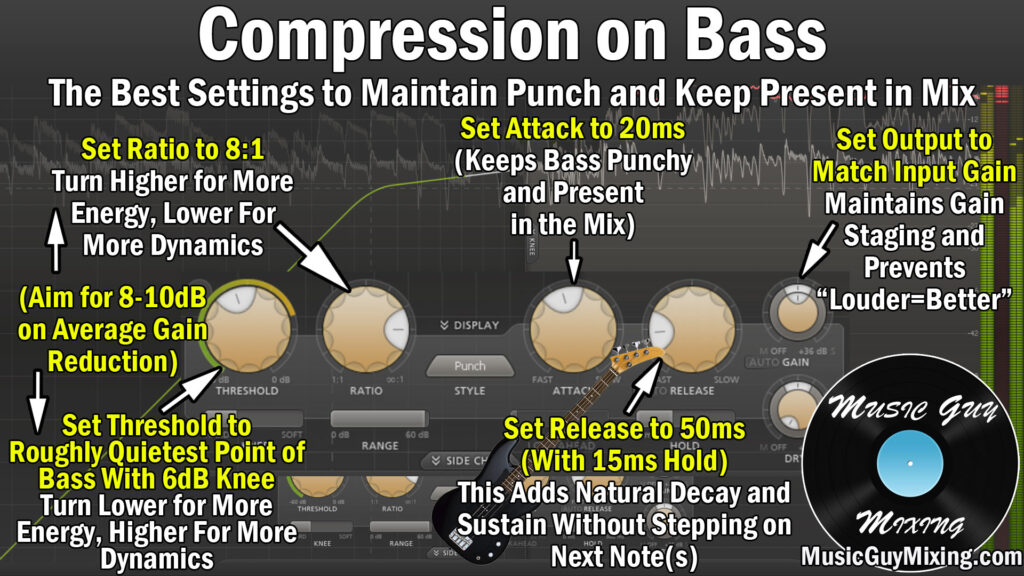
Let’s cover each of the audio compressor settings and where to set each one for the perfect control on your bass compression.
Threshold
The threshold determines at what volume that attenuation through that compression begins to occur. A good rule of thumb with bass is to include the full dynamic range, so set this to just below the quietest practical part of the performance.
Whatever the quietest note in the performance played is, set it there.
Ratio
The compressor ratio controls how aggressively we’re pulling down any decibels which exceed the threshold, measuring in a straightforward X:1 formula:
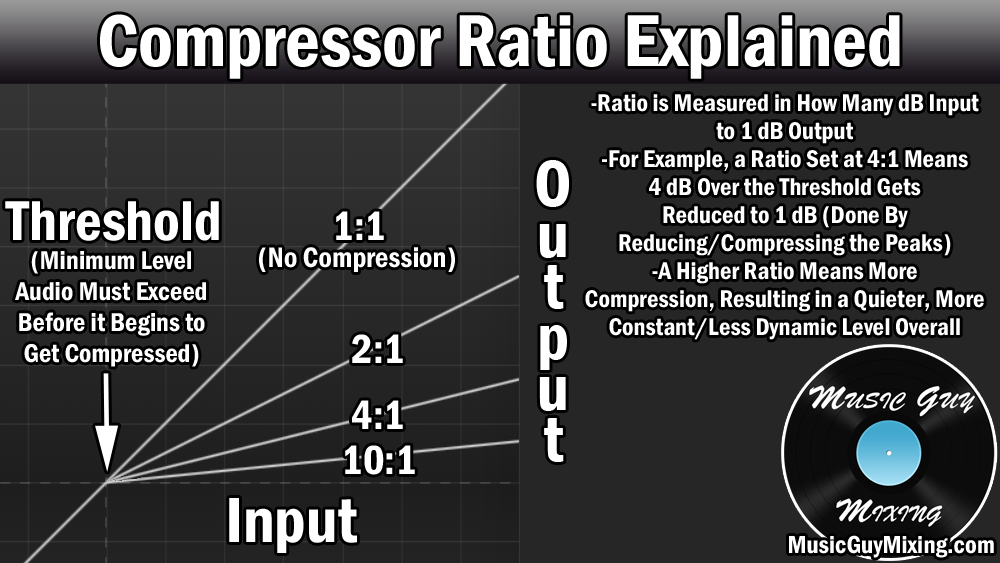
I like an 8:1 ratio with bass compression as this is an above average and aggressive amount of compression which is necessary to control the oftentimes especially dynamic peaks of the bass performance.
This means that every 8dB which go over the threshold will get output as just 1dB.
If there’s a peak which exceeds our threshold by 16dB, it will get output as 2dB over the threshold.
This helps to drastically reduce the difference between those quietest and loudest notes without completely removing the dynamics from the performance.
The effect of this is that the extremely important bass track remains constant and visible throughout the performance and mix.
Knee
A 6dB, relatively hard knee works well when compressing bass.
This just means that we’re strictly enforcing that threshold, with a bit of play in there to begin compressing the bass at a much lower ratio as it approaches the threshold.
Attack
Attack is about introducing a few milliseconds or so of delay before that compression engages once the threshold is met.
I mentioned earlier how the transient frequencies precede the rest of the tone. Setting your attack TOO short/fast to instant will yank down those important transient frequencies and swallow up the punch of the instrument, bass or otherwise.
You can get away with an attack as fast as 3ms or so with bass compression to preserve those transients, but don’t be afraid to dial it back as high as 20ms as a conservative estimate to ensure your bass is punchy while still enjoying the benefits and control of the compression.
Release and Hold
Release and hold both relate to how long the compression lasts once the threshold is no longer met. Specifically, “hold” adds a specific amount of time to keep the full compression effect on and “release” is the amount of time to return to its uncompressed state, both with regards to once that threshold is no longer met.
I like a release of 50ms with a hold of 15-25ms to create a nice buffer and off-ramp for the compression to transparently ease up after the signal drops below the threshold.
This avoids creating any artifacts, pumping, popping sounds, etc. for smoother compression and a better tone all around.
Output Gain
I just include this as a nod to the importance of gain staging.
By definition, compression reduces the volume of your audio. Most compressors have automatic makeup gain or at the very least an output gain control so you can make up for the gain reduction which took place during compression.
This helps you roughly match the volume post-compression that your bass had pre-compression which is important for maintaining gain staging:
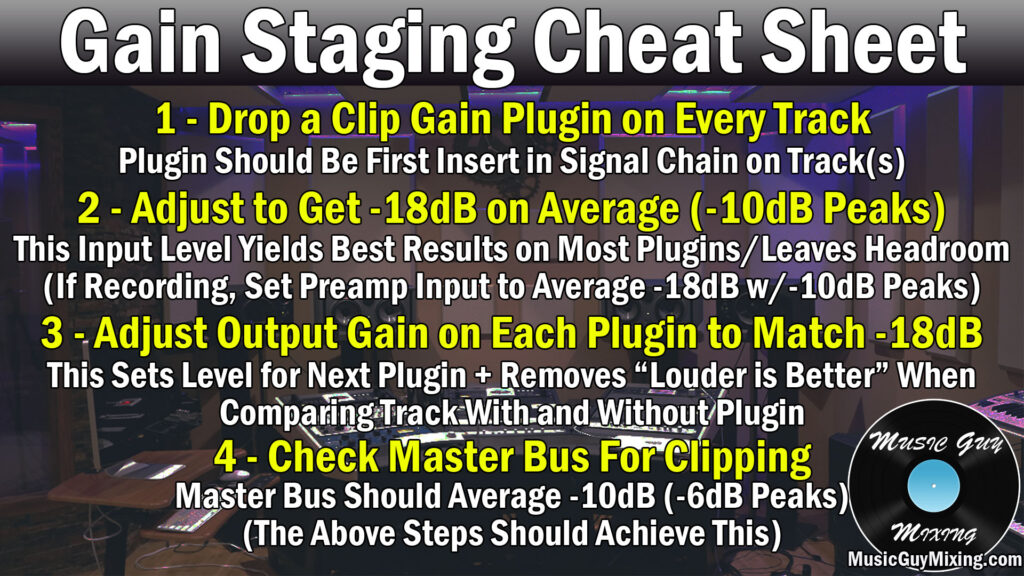
I didn’t mention it on the EQ, but obviously cutting or boosting the frequencies of your bass will change the volume, as well, so you should make sure to match the input gain with the output gain controller on your EQ to offset any changes you made via that EQ, as well.
This helps ensure that you’re keeping your bass (like every track in your mix) at a responsible level, not to mention feeding an optimal level into the next plugin in your bass chain.
Speaking of which, check out my complete guide on how to mix bass from start to finish.
Bass EQ and Compression Reviewed
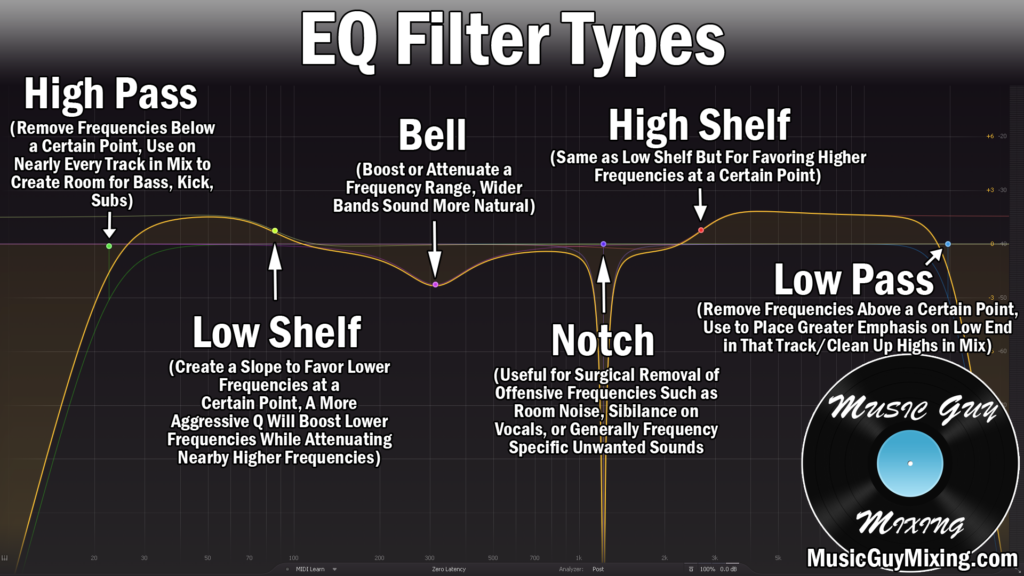
- High pass your bass as high as 40Hz to clean up your tone, remove rumble, and creating headroom.
- Create a sidechained, dynamic EQ cut on the bass at the frequency of your kick to help remove conflicts (typically 65Hz).
- Try a small boost at 100-200Hz to add warmth and body to the fundamental and overtone frequencies of the bass. You can also cut here to control a boomy bass.
- Dynamic cut at 300-400Hz to remove boxiness and create clarity on your bass.
- Boost at 4-6k to add transient punch from the string percussiveness and help the bass assert itself in the mix.
- Set your bass compressor’s threshold at the quietest practical note in the performance.
- Use an aggressive 8:1 ratio to control and tame the aggressive dynamic peaks of the performance and achieve a more consistent level.
- Use an attack of 3ms to preserve transients (setting it as high as 20ms to be conservative).
- Use a release and hold of 50ms and 15-25ms, respectively, to create a nice off-ramp and buffer for that compression.

Iwould like information on your course the complete mixing g system especially eq compression the right paremeters and reverb delay and what ever else etc.you could call me at 830 775 9182 in Texas USA thanks.