When it comes to audio mixing, a big part of the battle is attenuating unwanted noise in all forms which it can take. This can be removing vocal breaths, bleed from other instruments like in the case of recording then mixing a drum kit, etc. In the case of string instruments, the infamous “finger sound” can creep up and be distracting, taking away from the sounds of the instrument or notes themselves. The finger sound on bass guitar is especially apparent where the strings are much thicker on average than on electric or acoustic guitar.
The grooves are much larger and spaced farther apart which lends to a much louder and pronounced squeaking as you move from one fret to another.
Let’s talk how to address and fix the finger sound on bass in your next mix to help bring the focus back to the instrument and performance itself and not the unwanted artifacts of it.
How to Fix the Finger Sound on Bass

While I’ll address how to fix the finger sound on bass in the mix for anyone with a track which has this sound “baked” into the audio, it’s worth mentioning there are very effective steps you can take in the recording phase, as well, so let’s address both.
When You Record
First, it’s well worth mentioning that the absolute BEST thing you can do is to address this in the performance the next time you or the bassist is set to record.
It’s generally always best to get the best sound going in as not only does this mean less work for you in the mix, but it generally produces better sounding results in the end, and this extends to getting less finger sound on the bass on the recording itself.
How can you get less of the finger sound on the recording?
It sounds obvious, but simply applying less pressure to the strings as you move your fingers between the frets is the best way to address the finger sound on bass.
It takes some work and a lot of repetition to drill this into your head when you’re recording, but the difference is worth it.
It’s not about completely removing the sound of the fingers on the strings as a tiny bit of this is natural and not distracting in the performance. It’s more about finding that sweet spot of just enough tension so you can still smoothly move between the notes in a way that it sounds good but without the jarring squeaks on the strings.
Of course the exception is when you specifically are sliding down the scale as part of the performance, but otherwise, less force on the strings between notes is the key.
Different strings can make a difference, as well. They cost more, but Elixir’s NANOWEB bass strings are smoother and do a much better job at passively attenuating the finger sound on bass.
This is a good option if you’re having difficulty adjusting your playing style in applying less pressure to the strings, or you are and still aren’t satisfied with the results.
When You Mix
Odds are if you’re reading this, you’ve already got a problematic bass track with the finger sounds baked into the recording.
Thankfully you have a couple options for treating it in the mix, as well, so your perfect performance doesn’t need to be scrapped due to this frustrating and distracting artifact.
Dynamic EQ
The sound of sliding fingers on the bass strings occurs over a very long range between 2k to up and above 12k.
This is a lot of ground to cover, but thankfully I find that on bass the core of the unwanted noise is around 4k.
Armed with that knowledge, you can drop an EQ which is capable of dynamic bands, meaning a band which only makes an adjustment when a certain threshold is met, on your bass track.
Create a band around 4k (solo that band and sweep around here to find the fundamental frequency if you will of your bass track’s finger sounds:

Once you’ve found where the string sound is the most offending, the real key is setting that band’s threshold so that it ONLY attenuates on the finger sounds which will be louder bursts in the 4k range than the normal sound of the strings on their own.
As I covered in my bass guitar frequency chart, 4k is right on the cusp between the clarity of the bass and the transients and punch of your strings themselves:

As such, we don’t want to attenuate any of the brightness or punch of the bass itself as this will cause the bass to sound bland and disappear in the mix regardless of the level.
The EQ graphic above (made using FabFilter Pro-Q) demonstrates an attenuation of roughly 1.5dB at most at one of the performance’s most offending finger sounds.
This helps to smooth it out just enough such that it’s no longer distracting but without taking away from the bass’ clarity or drawing the attention of the listener to the plugin itself.
The exact frequency and certainly the threshold point will vary on your specific bass guitar track, but the above settings are a great place to start.
RX Guitar De-Noise
Lastly, there’s the most targeted approach of using one of Izotope’s RX tools in RX Guitar De-Noise to clean it up:
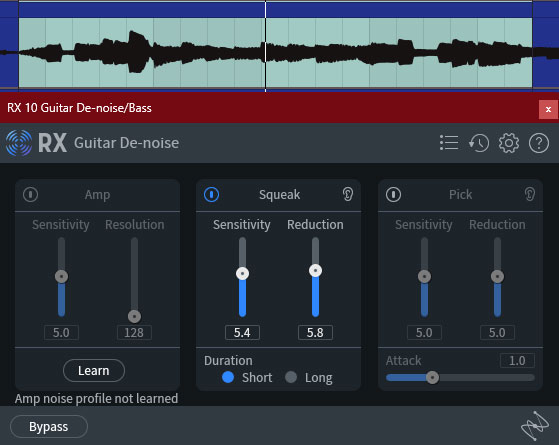
I dropped it directly on an offending bass track with finger noise in my mix and dialed in the above settings for the best results out of any of the methods mentioned.
As the plugin suggests, it’s trained to specifically detect the squeaks of fingers on strings, bass or guitar.
The above moderate settings achieved a perfect attenuating compromise where the sounds of the strings were dampened without taking away the life of the strings or the performance. Because it’s also targeting those higher frequencies on the bass, driving the sensitivity and reduction parameters too high will dampen the punch of the performance.
Like I mentioned earlier, it’s all about finding that sweet spot between a bit of attenuation to where it still sounds natural without taking away from the tone, and this plugin with the above settings is my go to for doing just that.
Just to acknowledge it, I’ve heard some make use of a de-esser, but I’ve never gotten the level of results with it which I’ve gotten with these two methods, but you might experiment with it, soloing and targeting between 3k to 6k and adjusting the threshold and gain reduction parameters to try to find that sweet spot.
Between the tips in both the recording and mixing stages of your audio production, your finger sounds on bass should be nicely addressed moving forward so listeners can focus on the tone and performance without the distraction of that noise.