One of the most frequent questions I get relates to the low end of the mix. Striking the right balance between the kick and bass is essential to getting the mix to sound clean and professional, so here is a brief and direct guide to mixing kick and bass.
Mixing Kick and Bass
Before we get to mixing kick and bass, make sure you can accurately hear the low end of your mix.
I’m specifically referring to the area the two low end heavy instruments share in that sub 150Hz and especially sub 100Hz range.
As I’ll expound on in great detail in a moment, the main fundamental frequency of the body of your kick is typically around 65Hz, give or take.
A dedicated subwoofer or monitors with a frequency response which are flat well below that will ensure that you can make informed decisions when you’re mixing kick and bass.
A more affordable alternative is to use mixing headphones vs speakers when you are focusing on the low end of your mix:

I have a pair of Audio-Technica M50X studio monitoring headphones which I initially got a decade ago for their affordability but can attest to their low end frequency response.
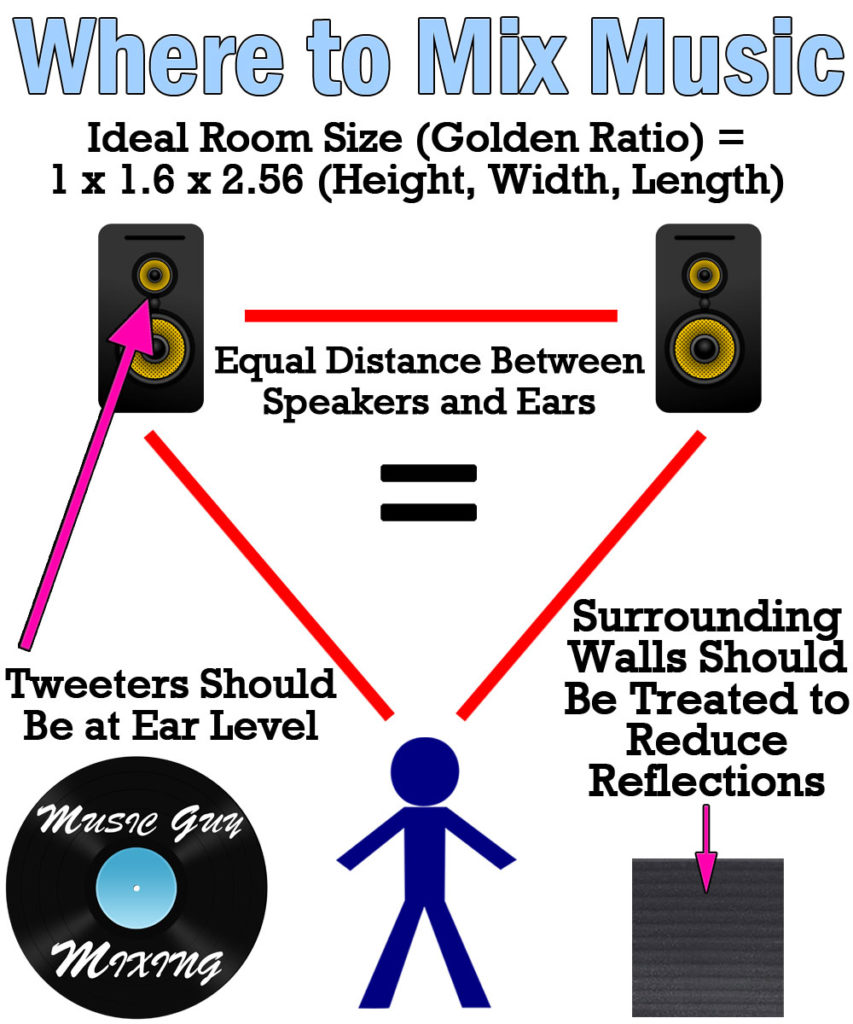
If you’re using speakers/monitors, bear in mind that the size and setup of your room will affect what you hear.
As I covered in my overview on where to mix music, there’s an ideal environment to mix your music to get the most realistic and accurate depiction of your mix:
Whatever you’re using to monitor/hear your mix’s low end, I also recommend having some reference tracks of your favorite mixes on hand so that you can hear how the low end of those mixes sounds through your setup.
This is especially helpful when trying to get the level balance between the kick and bass. It’s also much easier and more effective than my telling you to set the bass 6dB below the kick (for example).
Always check a reference track(s) with frequency while you’re mixing, bouncing back and forth to keep your ears refreshed and focused on your goal.
You might even apply a low pass filter on that reference and your mix around 200Hz to exclusively focus on the low end of your mix:

Just make sure you level match the reference track to your mix when you’re bouncing back and forth between the low end of your mix and the reference(s).
High Pass Every Track in Your Mix
If you’ve read any of my tutorials before, you know how often I preach the importance of high passing every track in your mix.
A high pass filter is a simple EQ filter which removes everything BELOW a certain frequency, allowing every frequency ABOVE that frequency to PASS through (hence the term HIGH PASS):

Along with creating some extra mixing headroom, allowing you to achieve a (better sounding) louder mix and master in the end, this cleans up the low end and reserves this frequency space for the two instruments which need it the most: your kick and bass.
While you should always listen carefully at what you’re removing, 100Hz is generally a safe point to high pass most tracks in your mix.

As I demonstrate above, that comes with an asterisk. To find the sweet spot you can get away with for most tracks follow this quick guide:
- First, apply a high pass filter at 100Hz.
- Toggle that filter on and off and listen for a change.
- If no palpable audible change exists (using monitors or headphones to accurately hear the low end of that track), begin sweeping up 5Hz at a time.
- Once you hear a change, roll it back down by 10Hz.
Repeating this process on your guitars, vocals, pianos, synths, brass, other drums, etc. goes a LONG way in instantly not just creating a better sounding low end but cleaning up your mix in general.
This is because we’re filtering out a great deal of the noise and anything which isn’t contributing to the sound we want.
Adding this up over the course of dozens of tracks and you’ll notice a serious improvement from high pass filtering alone for both the low end and entire mix.
Use Sidechain Dynamic EQ or Multiband Compression
Arguably the most important tip in mixing kick and bass is to sidechain your bass to your kick so that its level gets pulled down when the kick triggers.
This is useful because the kick and bass share a very similar fundamental frequency.
Normally the solution when you’ve got two instruments which share a similar frequency range is to separate them with panning.
The problem is that both the kick and bass sound best when they’re centered in the mix (as I covered in my audio panning guide):

Sending either instrument wide of the center will reduce its overall impact in the mix, and while the other solution would be to send one track further back in the mix via some depth effects like reverb, this will most serve to clutter up the low end.
As such, the solution is to sidechain the bass to the kick with some kind of attenuation processing.
While you can use a normal compressor to bluntly attenuate the entire bass (as I covered in my tutorials on how to sidekick bass to kick):
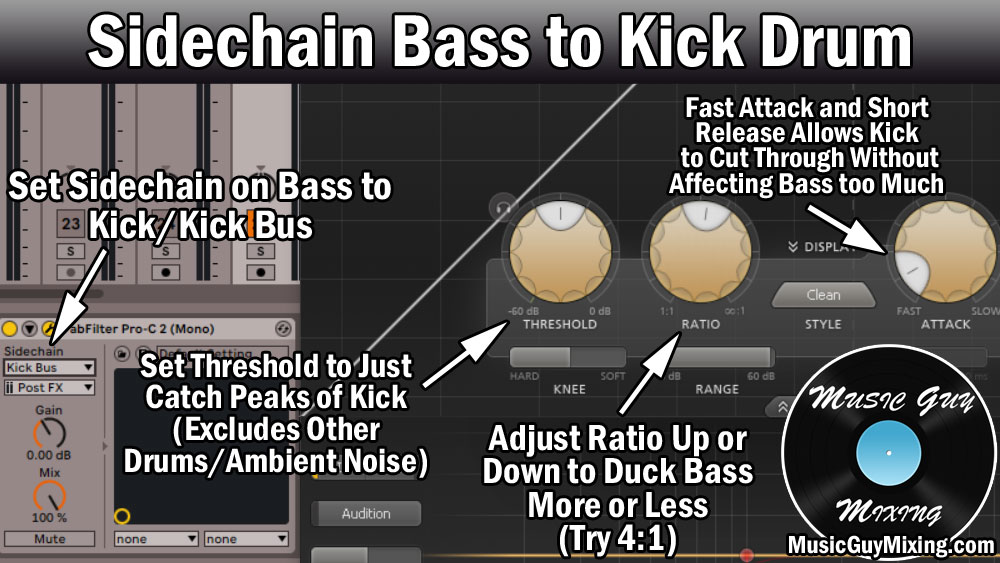
… a more surgical approach which exclusively targets the frequencies on the bass which the kick needs can be preferable.
I covered this in my overview of what is sidechain EQ, but targeting the fundamental frequency of the kick on your bass and sidechaining it to the behavior of the kick is a much more surgical approach.
As previously mentioned, the fundamental frequency on that kick is 65Hz:

With that in mind, on our bass track we can drop an EQ with the functionality of sidechaining and dynamic bands like my choice, FabFilter’s Pro-Q 3 or free EQ plugin like TDR-Nova.
Create a dynamic EQ cut band at 65Hz (or wherever your kick’s fundamental peak frequency is) on that bass EQ, then engage the sidechain functionality for that EQ and select the kick as the track you want dictating that band’s cut behavior.
This is roughly what it looks like when done in Ableton Live:

As you can see, I’ve got a decently wide Q setting between 1 and 2 to pull out a nice chunk of surrounding frequencies on the bass to cover well the fundamental of that kick.
Adjust the threshold for that cut as well as the range limit to create the side of the cut as desired.
Altogether, I like to achieve a cut of 5-10dB or so around 65Hz on the bass when that kick triggers.
The beauty of using dynamic EQ or multiband compression is that it’s much more discerning in only pulling out the main frequencies the kick needs to sound its best from the bass, and only when that kick triggers.
This is far more efficient and effective than simply making a uniform cut to the lower end of the body of the bass which needs those frequencies just as much as the kick does:

As you can see, the fundamental 65Hz of the kick is right there in the fundamental pocket of the bass guitar, as well, existing between the open A and D strings.
Dynamic/frequency based sidechaining achieves the best of both worlds in giving the kick the space it needs while keeping the bass as preserved as possible.
This is arguably the most important element of mixing kick and bass like the pros.
High and Low Pass Your Reverb
I opened up by talking the importance of high passing every track in your mix to create frequency space for mixing kick and bass.
A lot of people forget to apply this to their reverbs which are oftentimes one of the major contributors to a muddy mix, not to mention a cluttered low end.
As these artificial reflections build up, they start to mire the low-mids and even low end of your mix which detracts from your kick and bass.
The solution is simple and one I’ve covered many times in the past: the Abbey Road Reverb trick:
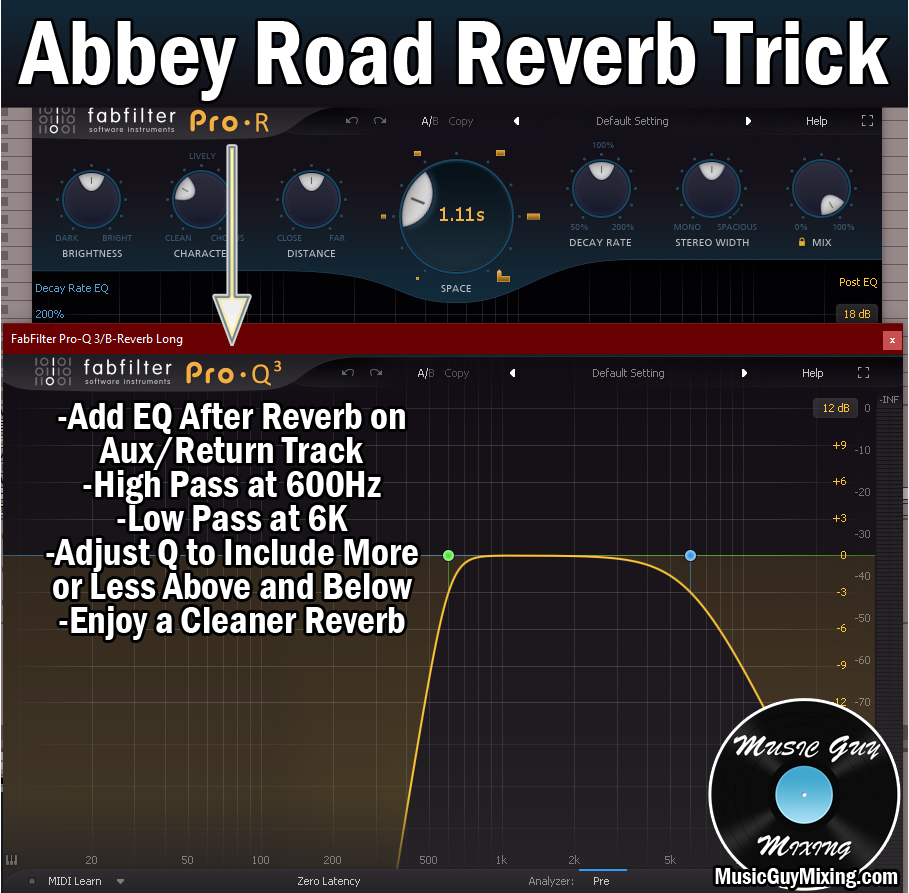
While most reverb plugins have onboard filters, there’s no substitute for following one on its Aux/Return track with your EQ of choice and manually adding in a high and low pass filter.
It’s the high pass filter specifically at 600Hz which ensures no reverb is heard below that cutoff point, ensuring the low end of our mix is reflection free, dry, and hard hitting.
Note that 600Hz is just the recommended point; you can go lower if you want to preserve more of the simulated depth by way of the reverb.
Speaking of hard hitting, make sure both the kick and bass have their transients intact by adding a little attack to their respective compressors to maintain their visibility (grab my free compression cheat sheet for detailed graphical tutorials on the best settings for every instrument type in your mix).
Speaking of visibility and punch, you might also check out my quick tutorial on how to ADD audio transients to any track to give them adequate punch in the mix.
In a similar vein, check out my free EQ cheat sheet for similar visual guides on where to cut and boost your kick and bass (outside of the sidechain move covered earlier, of course) to get them sounding their best.
Mixing Kick and Bass Tips
- Mixing kick and bass properly is the cornerstone of your entire mix; if they’re not gelling and working together, the entire mix will sound off.
- This can only be done properly if you can adequately and accurately hear both tracks, so consider some low frequency response headphones when focusing on mixing kick and bass to get the best results.
- Use reference tracks and consider high passing them around 200Hz to get a clear idea of what good low ends sound like.
- Bounce back and forth by assigning that reference track a hot key so you can instantly refresh your ears with your end goal in your mix.
- High pass every track in your mix beginning at roughly 100Hz to ensure you’re cutting noise and prioritizing that frequency lower frequency range for the kick and bass which need it the most.
- Sidechain your bass to your kick so that the bass ducks out when the kick triggers to create a cleaner low end of your mix, as well.
- Use dynamic EQ or multiband compression to exclusively target the fundamental of the kick (around 65Hz) on your bass to preserve more of the bass while enjoying the benefits of the sidechain.
- Don’t forget to filter your reverb(s), as well, to maintain clarity in and prevent any reflections from cluttering up the low end.