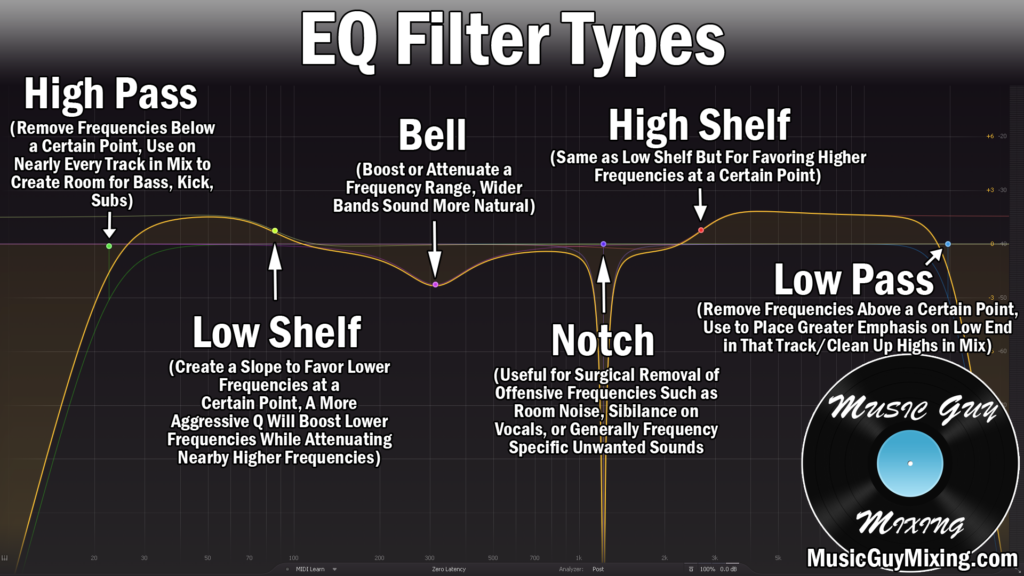
I always liken the bass drum as the anchor to your entire mix. It keeps the tempo, it keeps the rhythm, and ultimately keeps the listener grounded and familiar with the mix from second to second. When the bass drum isn’t asserting itself as it should, when it’s not completely visible in the mix (figuratively speaking), the entire mix suffers. One of the most impactful types of processing you can apply to your bass drum is EQ, so let’s cover 6 tips on how to EQ a bass drum to ensure its tone is perfectly sculpted in the mix.
How to EQ a Bass Drum

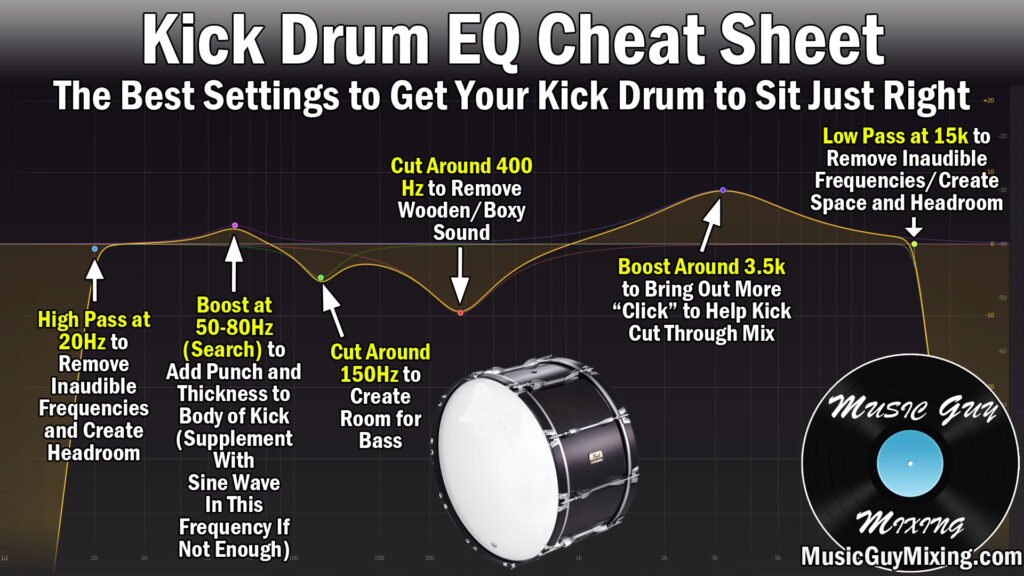
Here is a snapshot of the moves I generally like to make when I EQ a bass drum in my mix; I’ll subsequently cover each tip in greater depth but this is a great place to start:
High Pass at 20Hz
Every single track in your mix can benefit from a high pass filter, and that even extends to your bass drum. Despite its relatively low fundamental frequency range, you can conservatively high pass it at 20Hz (with an 18dB/oct slope) without losing anything.
Why 20Hz? Because this is as low as the human ear can perceive, so this absolutely ensures we’re not losing even the lowest practical frequencies.
Nonetheless, this removes inaudible noise which will ultimately add more headroom to your mix, meaning you can get a competitively louder sounding mix without sacrificing the sound quality by over-limiting or compressing to get the same results.
Boost or Supplement at the Fundamental (~65Hz) and Address on Bass
When we talk a track or instrument’s fundamental frequency, we’re talking about the frequency range that track is loudest at. In the case of the bass drum, this is the body or “meat” of that kick, the thud you hear whenever it triggers.
This is typically in the 50-80Hz range, but especially right there in the center around 65Hz (though this may be slightly higher or lower, depending on the kick).
A small boost can benefit a slightly thin sounding kick by bringing out more of this body and shifting the overall sound of your bass drum to a warmer tone.
If your bass drum is seriously lacking in that all-important 50-80Hz band, you may be better off supplementing your bass drum with a low frequency sine wave:
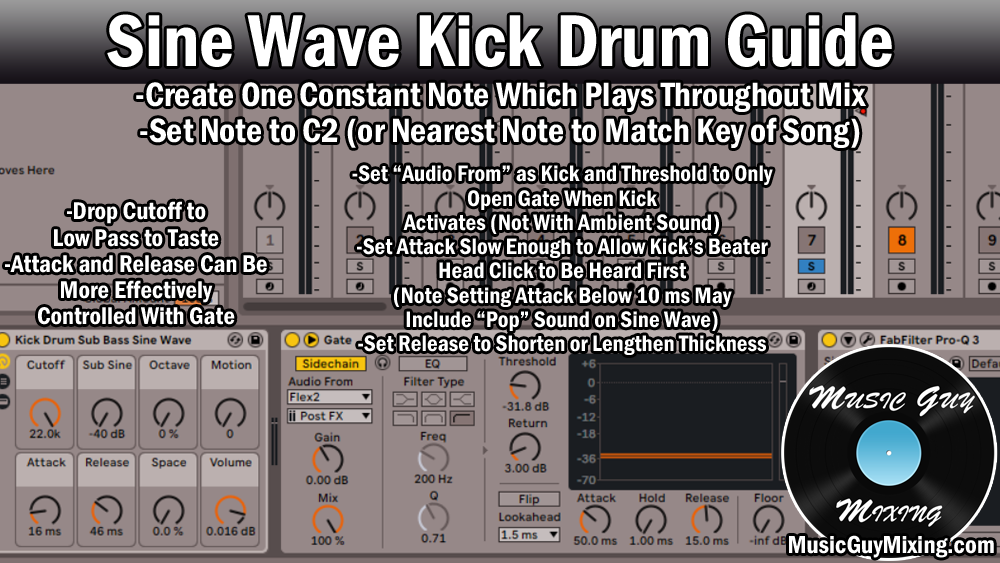
As the image explains, this involves adding a track with a low frequency sine wave then dropping a gate on it and sidechaining it to your kick.
The result is this low frequency sine wave (which can be set to match the key of your mix for a nice boon) plays only when the kick triggers and its gate opens up, giving the exact impression that your bass drum has that body that it was previously lacking.
I talk about it in complete depth in my overview on the sine wave kick drum trick, so refer to that for more information.
Additionally and as an added tip in the REALM of how to EQ a bass drum, I recommend doing a complimentary sidechain EQ cut on the BASS in order to pull down or otherwise duck around 65Hz on your mix’s bass when the bass drum triggers.
Here I’m applying the FabFilter Pro-Q EQ on my bass, creating a dynamic cut at 65Hz, and specifying the kick/bass drum as the sidechain target:

This gives the bass drum the entire low end to itself in those split seconds when it triggers and sounds in the mix.
As I covered in my guide to low end mixing, this is a great way to get the bass drum and bass itself to cohabitate the same frequency range in the mix considering they share that similar fundamental range but you generally can’t or shouldn’t pan either of them to the sides or push either farther back in the mix.
One LAST EQ bass drum tip for this all important frequency section – try simultaneously boosting AND cutting your bass drum at 60Hz using a Pultec EQ:

Known as the Pultec trick, this adds warmth and body to your bass drum, so grab a free Pultec EQ like the PTEq-X from Ignite Amps and try it in your next mix.
Cut Around 150Hz to Create Room for the Bass
Getting back to the EQ bass drum tips, let’s likewise create a complimentary cut on the bass drum around 150Hz for the bass.
150Hz is where a lot of the body and early overtones of the bass exist, so a small cut here on the bass drum above its body can help the bass and low end in general sound cleaner, just like we did with the complimentary cut a moment ago.
A small, static 1-2dB cut works well for cleaning things up without working to the detriment of the bass drum, and your entire mix will benefit from it.
Cut Around 400Hz to Remove Wooden/Boxy Sound
The bass drum’s signature unflattering wooden boxiness asserts itself around 400Hz, so a subtractive EQ style cut works well here to actually add some desirable clarity to your bass drum without having to boost higher up for that purpose.
You can use a dynamic EQ cut if your EQ plugin allows for it, but given that the bass drum has a very consistent frequency pattern in yielding roughly the same sound every time, a static cut of 2-3dB works well.
This carves out and contours your bass drum’s tone nicely, but that’s not to say that it can’t benefit from ANY boosts higher up.
Boost Around 3.5kHz to Bring Out Transient Punch
I was alluding to a small 2-3dB boost around 3.5kHz as this is where the clicky sound of the beater against the bass drum resides.
When we talk about a bass drum being punchy, we’re talking about a bass drum which is well represented in this regard.
The “click” of the beater on the drum precedes the warmth and fullness of the body (due to the relative greater speed of high frequencies vs low frequencies), so this is the first thing the listener hears of the bass drum.
This transient rich click draws their ears to the rest of the tone. In other words, the transient punch keeps the bass drum present in the mix. Oftentimes when it feels like your bass drum is set properly in the mix from a level perspective but it’s still not as visible as you’d like, it’s due to a lack of punch.
Boosting more around 3.5kHz can help, but also be aware of the attack time and other settings of your kick’s compressor. If the attack is set too fast/short/quick, the compression could be swallowing up or otherwise attenuating that initial transient, thereby reducing its visibility in the mix.
Low Pass at 15kHz
Lastly, you can conservatively low pass your bass drum at 15kHz.
This ensures you’re not removing anything you can generally hear from the bass drum while also creating a touch more headroom and saving these frequencies for the high frequency rich instruments and tracks in your mix which need them.
Use these tips to effectively sculpt the tone of your bass drum via EQ, then check out my complete guide on mixing bass drum to get your bass drum sounding and sitting perfectly in your next mix.
EQ Bass Drum Tips
- High pass your bass drum at 20Hz (and low pass around 15kHz) to create a touch of headroom without sacrificing anything musical.
- Boost your bass drum by 1-2dB in the 50-80Hz range to bring out more body.
- For a severely thin bass drum, supplement it with the sine wave trick as described above.
- Do a complimentary sidechain cut in the 65Hz range on your bass to allow the bass drum full dominion over the low end when it triggers.
- Try the Pultec trick as described above to add even more fullness, warmth, and body to your bass drum.
- Create a small 1-2dB cut on the bass drum around 150Hz to compliment the bass.
- Cut by 2-3dB around 400Hz to clean up the boxy wooden sound of your bass drum and give it a touch more clarity by way of that subtractive EQ move.
- Boost around 3.5kHz to ensure your bass drum stays punchy and visible in the mix.
- Likewise, pay attention to the attack time and other compression settings on your bass drum to ensure you’re not swallowing up those transients you just helped boost.