I recently covered bass drum EQ tips which you can use to sculpt and clean up your bass drum’s tone. While it’s certainly not the most dynamic of instruments in your mix, a little bass drum compression can go a long way in smoothing out inconsistencies in the performance to ensure that what is essentially the anchor of your entire mix is consistent and always well represented and visible. Bass drum compression can also bring out more sustain on the back end and otherwise thicken it out. With that in mind, here are some bass drum compression tips for achieving a pro sound from your bass drum.
Bass Drum Compression
Here is a snapshot of the bass drum compression settings I typically dial in:

Let’s go through each audio compressor setting covered here to better explain why I recommend the moves which I do.
Threshold
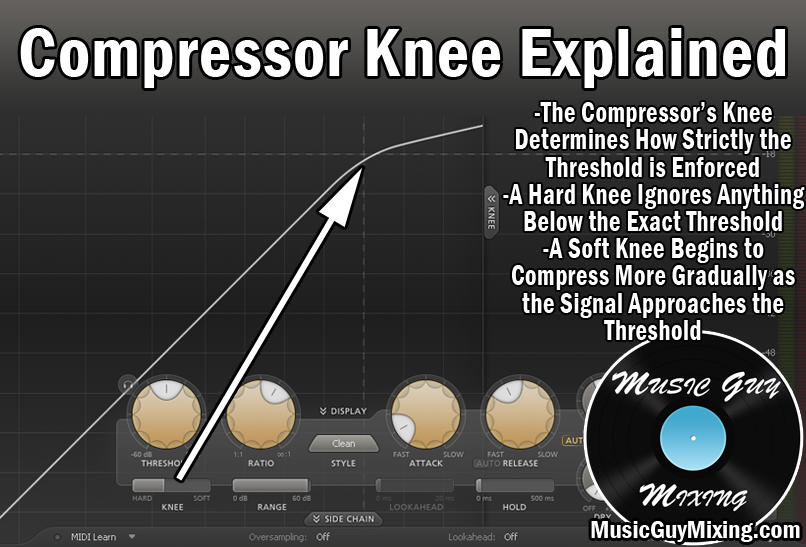
The threshold on a compressor determines the level the instrument, in this case the bass drum, needs to reach before any compression happens. Setting this too low will over-compress your bass drum. Setting it too high means no compression will happen at all because the threshold will never be met.
As a general rule, I like to set this roughly 5-10dB below the loudest peaks:

If the bass drum peaks at -10dB, set this to -15dB to -20dB. If you want to preserve more of the natural dynamics of the bass drum, meaning the difference between the quietest and loudest hits in the performance, go on the higher send (-15dB in the example). If you want more compression and thus more energy, aim lower (-20dB in the example).
Really, as the first image demonstrates, we want to achieve just 3-5dB in gain reduction at most, but this takes every parameter into account. With that in mind, you really need to set all of these together and adjust them as necessary, but let’s move on to arguably the most important parameter on any compressor, the ratio.
Ratio
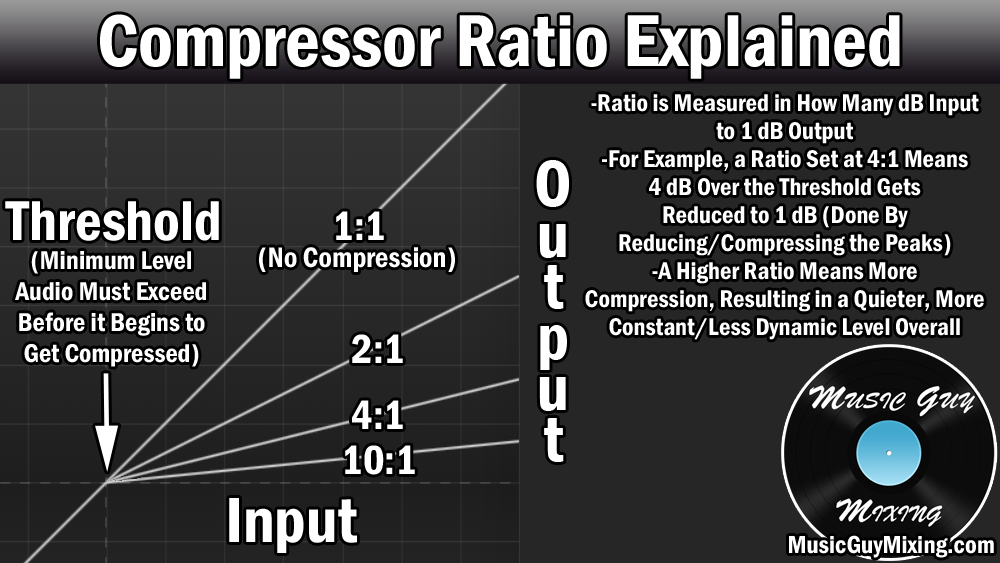
I call the ratio the most important parameter on the compressor as it’s the major driver of the degree of compression (see compressor ratio explained).
I like setting this to a ratio of 5:1 on my bass drum, though you can aim higher if you want more energy and lower if you want more dynamics and punch:

The 5:1 ratio means that every 5 decibels which exceed our threshold, they’ll be output as 1dB instead, thus resulting in 4 decibels of gain reduction (5-1). This is why I recommended a 5dB below threshold on the peaks as this achieves that 3-5dB pocket we’re going for in gain reduction.
Again, it’s to taste; if you feel your bass drum benefits from a more compressed sound which lends itself to more thickness and energy, you can set that threshold lower.
Attack
The compressor’s attack is the delay or offset time once the threshold is met.
I recommend an admittedly conservative 15ms attack time on bass drum compression:

What this does is when the threshold is met, the compressor delays the compression by 15ms by virtue of that attack time. Because higher frequencies travel faster, we hear the higher frequencies of the bass drum a tiny fraction of a second ahead of the lower frequencies.
This means we hear the “click” of the beater on the drum. This is known as the bass drum’s transient and is what keeps the bass drum punchy and visible in the mix because that click draws the listener’s ear to the rest of the sound, the fullness of the body of the bass drum.
Again, I admit that this is a conservative amount; you can try aiming 10ms faster to get more fullness on the back end from the compression and generally without sacrificing that punch, so experiment with this setting as you see fit, paying attention to its effect both on the higher and lower ends of the bass drum.
Hold and Release
If attack is the entry point of the compression, hold and release control the exit point.
First, I like a hold time of 20ms which adds sustain to the kick:

The compression lingers at that 5:1 ratio for another 20ms even after the threshold is no longer met which can add a tiny, almost imperceptible layer of thickness to the back end.
After that we have the release which I like setting in the 30-50ms pocket on the bass drum:

This keeps the bass drum responsive while adding a touch more sustain, not to mention creates a natural fade of the effect of the compression so you’re not left with any annoying artifacts which can come from setting the release back to an uncompressed state too quickly/fast.
Output Gain
As I always recommend, particularly with compression, make sure you set the output gain so that the level of the bass drum matches what it roughly was pre-compressor.
Compression as a rule attenuates the peaks or in other words turns down the overall volume of whatever you apply it to. In the interest of maintaining the level balance we achieved before the compression across our mix, take a moment to account for and replace whatever decibels you lost in gain reduction by turning up the output gain dial accordingly.
When you hit the bypass on the compressor, the bass drum should roughly sound at the same volume as it does with the compressor engaged.
Bass Drum Compression Tips
- While the bass drum is one of the least dynamic instruments in your mix, there is some variation between the level of hits. Bass drum compression can help smooth this out to ensure one of the most important instruments in your mix is consistent and visible.
- Set the threshold to roughly 5-10dB below the loudest peaks.
- Set the ratio to 5:1. Like the threshold, go more aggressive (or higher in this case) if you want more energy, less dynamics, and more back end thickness.
- Set the attack 5-15ms to ensure the transient punch or higher frequency “click” of the bass drum is preserved to keep the track fully visible in the mix.
- Set the hold and release times to 20ms and roughly 40ms, respectively, to create a natural tail off of the compression, keep it responsive, but also achieve a touch more sustain.
- Set the output gain as necessary to makeup for the (ideally) 3-5dB in gain reduction which you created by way of the bass drum compression.