
One of the hallmarks of professional, top 40 mixes is clear vocals, mostly irrespective of the decade or era. Clear vocals are achieved both through the recording and mixing processes, so let’s talk how to get clear vocals in your next project.
How to Get Clear Vocals

As mentioned, clear vocals begin in the recording stage and end in the mixing stage, so let’s go linearly and first cover how to record clear vocals.
How to Record Clear Vocals
Recording clear vocals begins with a good microphone. Clear vocals doesn’t just mean top end clarity, it means a well balanced vocal.
Most cheaper/lower end microphones lack low end frequency response, meaning they’re ill-equipped at capturing the body of the voice.
I did an entire overview on the best vocal mic for every budget, so refer to that for more information on my picks regardless of how much you have to spend.
With a solid frequency response which extends down to 50Hz before losing any depth and a relatively flat response through the upper-mids, the Rode NT2-A is one of my favorite affordable, well rounded vocal microphones:

It has some subtle inherent clarity spikes between 5-6k with a natural high shelf just above 10k which make it an excellent choice for clear vocals under $400:

Next is to record in a suitable environment. Generally speaking, you either want to record in a small treated room, like a vocal booth which absorbs reflections, or a larger space which minimizes their effect. In the latter, the same ideal space of where to mix music works well for recording vocals:
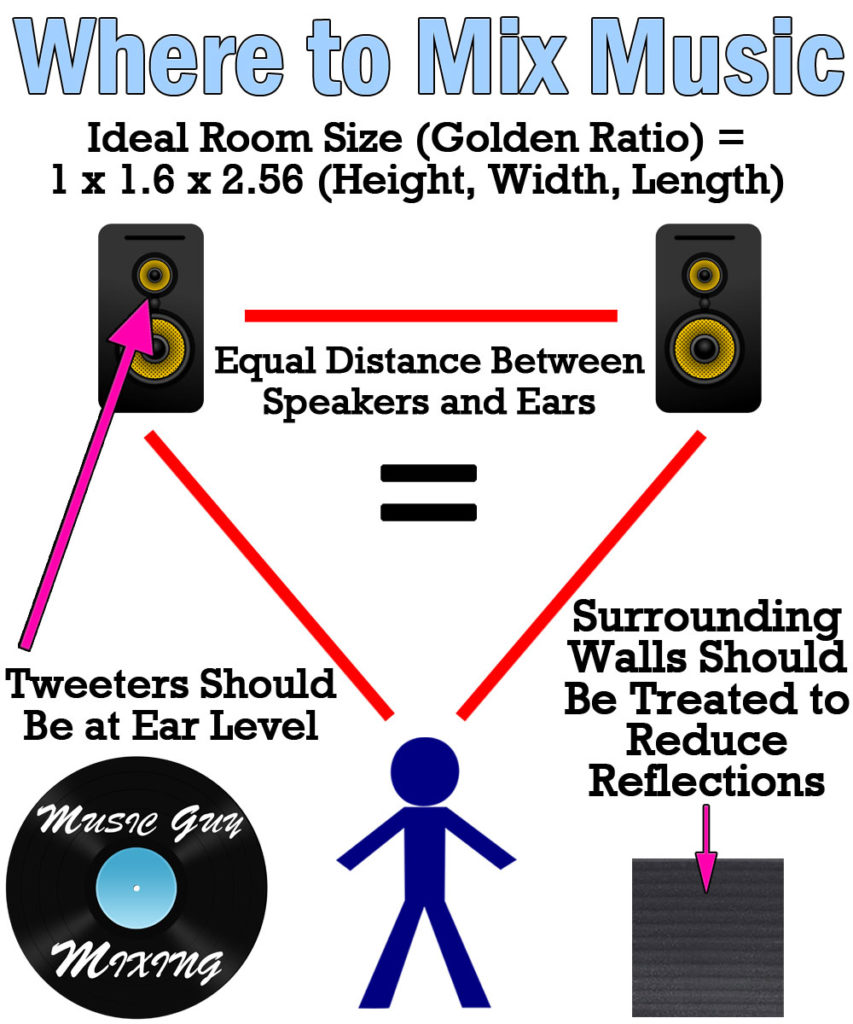
You generally want to face the longer end of your room, and favor setting up the microphone farther away from the far wall.
Singing farther away from the microphone itself brings more of the sound of the room into the vocal, sacrificing its clarity. As such, you want to be within 6 inches of the microphone.
Try to remain consistent in your position relative to the microphone during the performance, as well. Some vocalists instinctively back away from the microphone when they belt a note, so account for this with your distance from the microphone at the start.
Also be sure to adjust the gain via the microphone or your recording hardware to average -18dB or so with -12dB or so on the belted/loudest words.
This will save you time from having to gain stage that vocal later in the mix and will yield a better sounding vocal once all the processing in the mix has been applied.
Lastly, mitigate as much outside noise as possible before recording. Clear vocals are recorded in a quiet environment devoid of outside noise as well as inside noise like the air conditioner, computer fan, etc.
We’ll address a bit of this in the mixing stage, but like I always say and you’ll always hear, the better the recording, the better the mix and final product.
How to Mix Clear Vocals
Once we have our ideally clear recorded vocals, we can address some of the issues we may have had in the recording stage.
EQ is the “effect” which we use to sculpt the frequencies of our audio to achieve a certain result, or in the case of pursuing clear vocals, it’s just about cutting out what’s not working and propping up what is with a view for clarity.
I have a specific EQ template I like to use for vocal clarity – here’s a snapshot:

I just talked about where to set your high pass filter for vocals. This is an effective first step for removing frequencies below the body of the voice which are either inaudible frequencies of the voice we don’t need, room noise, or both:
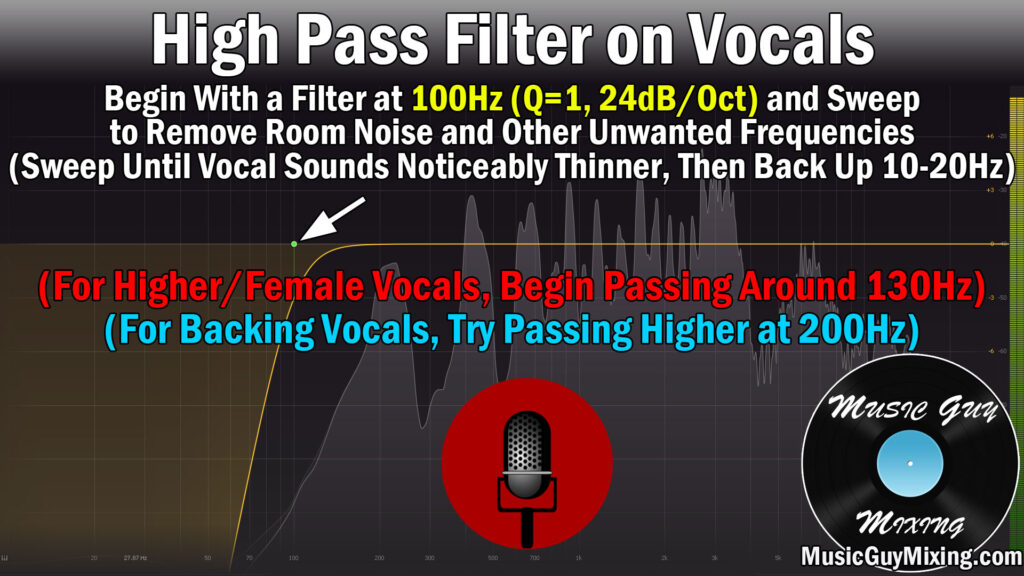
For male vocals, I like to use 100Hz as my starting point, and female vocals I’ll go up to 130Hz, each with a Q setting of 1 and a slope of 24dB/oct.
Note that this is just a starting point; sweep up as you listen closely to the vocal on a good pair of mixing headphones until you hear the vocal change/thin at all. At this point, dial that frequency point back down by 10Hz and you’ve already done a lot in cleaning up that vocal and achieving the clear vocal sound you want as this removes some of that room noise and unmusical frequencies. This will also benefit the rest of the mix by creating space for your kick and bass.
Next, you’ll notice that I offer an optional attenuation in the body of the vocal around 200-300Hz in the case of a boomy vocal. This is more of a corrective measure in the case of a vocal which was improperly recorded and thus is improperly balanced.
You’ll get this on bad microphones where singers try to overcompensate for that lack of a low end by getting right up on the microphone and especially when a pop screen isn’t used. Aside from having to deal with vocal plosives, a dynamic EQ cut in that 250Hz pocket can help rebalance a bottom and boom heavy vocal.
Moving up to the next clear vocal swallowing point, I always preach a cut or dynamic cut in the 500Hz pocket as this is the source of a lot of reflection buildup on vocals and an unflattering sound on most instruments in general. I talked about this in one of the earlier tutorials I covered on this site in my overview on how to deal with a muddy mix:
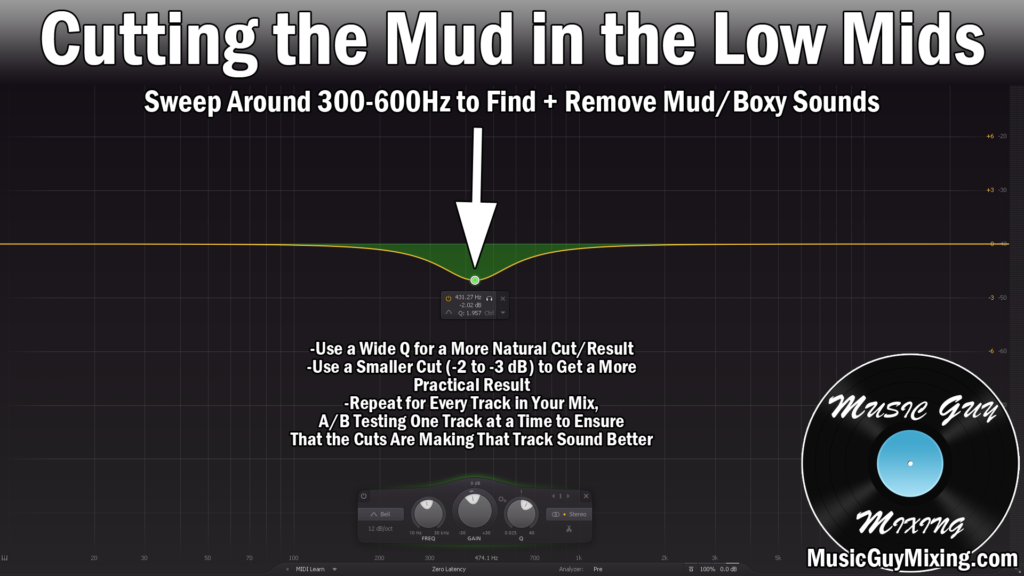
A cut or dynamic cut at 500Hz on a vocal is a two-birds-one-stone solution as it cuts out a routinely unflattering frequency range which detracts from a vocal while simultaneously propping up the remaining frequencies on the higher end (also known as subtractive EQ).
You’ll notice I labeled 1-2k as the target for correcting a hollow vocal. A small boost here adds fullness to your vocal in the front end of those clarity frequencies, but it’s not always necessary. In fact, boosting here when it’s not necessary will bring out the nasal quality of the vocal.
Speaking of the clarity frequencies, the most typical move is to boost a vocal in the 3-5k range to artificially bring out more of the brightness of the vocal. A nice wide boost of 1-2dB around 4k can go a long way in achieving clear vocals, but it’s an instant gratification that’s so pleasing that it’s easy to OVER boost this band.
Similar to how we could inadvertently make our vocal sound nasally by boosting too much around 1.5k, too much in that 4k range can make a harsh vocal which is grating to the ear.
As always, I recommend having a reference track at hand of a mix with a vocal you like the sound of to jump back and forth between to keep your ears trained on the vocal sound you’re looking for. A reference track with a singer similar to the one you’re mixing is even better in its specificity for giving you a clearer goal (no pun intended).
One last thing we associate with clear vocals is that crispness on the top end of the vocal. What many refer to as vocal “airiness” can be brought out with a high shelf on vocals around 10k.

The ear isn’t as sensitive to these higher frequencies, so we can get away with bringing out more of those overtones of what we boosted in that 4-5k range up with this 10k shelf like shown above.
If you feel your vocal is still missing something which might have been missing in the recording stage and thus EQ can’t effectively bring out, try adding some high end saturation in the form of an exciter.
An exciter gets its name from the fact that it boosts the more immediately hitting high end of whatever we apply it to:

I especially like the Aphex Vintage Aural Exciter when I want to add some subtle clarity to a track which I’m not getting from EQ, primarily to vocals:

It’s a gratifyingly simple interface; you simply turn up the AX Mix dial to taste until you get the sound you want; a bit of a cheat code which a lot of producers tap to get the clear vocals that you hear in a lot of commercial mixes.
Lastly, don’t drown your vocal and mix in reverb.
Like a lot of producers make the mistake of boosting too much of the clarity frequencies on the vocal, likewise do they make the mistake of using too much reverb on the vocal or across the entire mix. There’s no faster way to sacrifice vocal or mix clearness than drenching your mix in unrealistic amounts of reverb (unless that’s the aesthetic approach you’re going for).
Refer to my overview on vocal reverb for a complete guide on how to responsibly and effectively use this spacial effect in your next mix on vocals.
Ultimately it’s a simple process to get clear vocals:
- Get a clean, balanced recording from a microphone with a relatively flat and fully encompassing frequency response in a treated or ideally sized room, mitigating as much noise as possible.
- Use EQ to filter out below 100Hz (sweep up to find your vocal’s ideal high pass filter spot without thinning the body).
- Dynamically cut at 500Hz to remove mud and reflection buildup proportionately as necessary.
- Add a small 1dB or so boost around 4k.
- Add a small 2dB or so high shelf around 10k.
- Add some subtle high frequency saturation via an exciter to bring out some clear vocal sound on vocals which are lacking inherent top end which EQ can’t bring out.
- Keep your vocal reverb and mix reverb in check.
Of course a big part of getting clear vocals is having a clean mix, so check out my entire tutorial on getting a clean mix all around to make every aspect of your mix sound better.
