Parallel compression, AKA New York compression because of its origins, is an extreme type of compression where the goal is to completely remove the dynamics of the audio you’re compressing. The inherently extreme parallel compression settings give the audio the effect of having a lot of energy when everything is coming out at the same level.
Admittedly you’re not going for a transparent or natural sound in this case, and typically parallel compressed audio is blended in alongside the normal, dry instance of that audio. When blended together with subtlety, the parallel compression settings on the “wet” instance of the audio makes the “dry” instance of the audio sound thicker and fuller.
Parallel compression works well on drums and vocals in particular, but it can be applied to anything which could use a little more impact in the mix.
Thankfully, the same parallel compression settings can be applied to multiple tracks with one caveat, so let’s cover the best parallel compression settings to dial in to your compressor of choice.
The Best Parallel Compression Settings
Below is a snapshot of the recommended parallel compression settings to dial into your compressor of choice. I like to use it as I do most parallel processing in creating an Aux/Return track and putting the compressor on there, allowing you to keep it separate from the tracks you apply it to and blend to taste.
Note when I say compressor of choice, this excludes say an optical compressor or something known for lighter and more transparent compression, even if you crank the gain.
While I like the versatile FabFilter Pro-C compressor, your DAW’s stock compressor should work just fine. Anything with the standard audio compressor settings that we think of.
Speaking of the settings, let’s take each one, one by one, from these best parallel compression settings:

Threshold
The compressor’s threshold in parallel compression settings is the one caveat and wildcard as different instruments or tracks better said will have different noise floors.
You can GENERALLY get away with using one instance of a parallel compressor as an Aux/Return track and blending in your desired amount from track to track via the send dials in your DAW.
That said, there may be a track or two which is especially quiet or has a lot of room or other related noise on the track which you’ll be inadvertently boosting via the threshold being where it is on your parallel compressor.
This is just one more reason why addressing noise before by treating your room, muffling computer noise, turning off the AC, etc., and after recording with noise gating is a good idea.
The threshold is the wildcard, so I can’t quote a perfect negative decibel point to set this at. Setting it too low will needlessly introduce noise, so find that sweet spot which the track or tracks which you’ll be applying it to most chiefly needs.
Ratio
The ratio on parallel compression is the main driver of the sound that we’re going for and we want to set this to the max of whatever our compressor is capable of. While some compressors (like the Pro-C) can go to 100:1 or essentially an infinite ratio, even a 20:1 on a FET compressor will virtually remove the peaks and squash your audio:
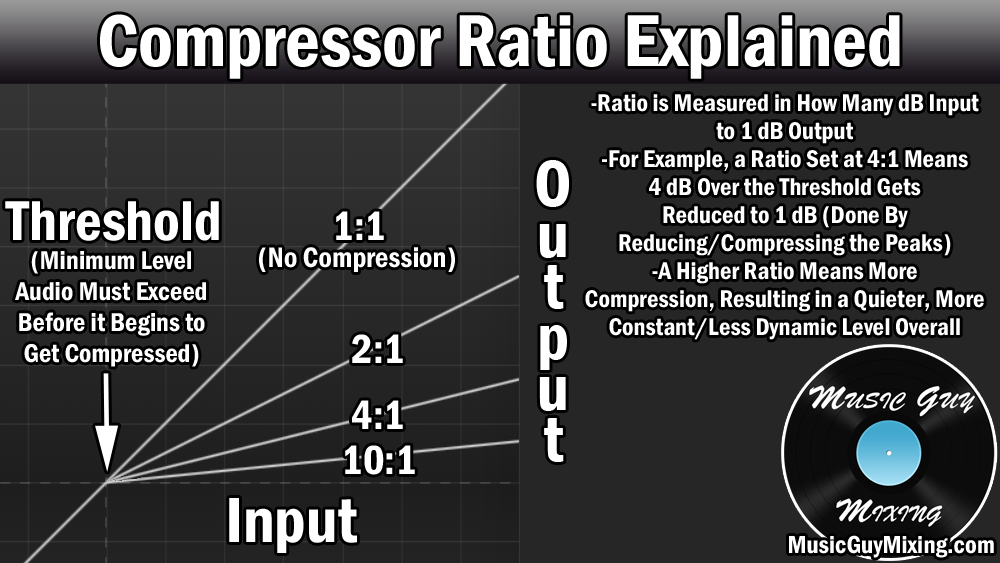
This means that every dB over the threshold will be reduced at a ratio of 20:1. So every 20dB over the threshold are getting reduced to 1dB over. Assuming the threshold is set low enough to compress the entire practical dynamic range of your audio, it’s all getting output to close the same level.
This is especially true with an even higher ratio like the aforementioned 100:1 which gives your dynamic audio that sausage-like appearance post compression:

While this would sound strange and unnatural on its own, that’s the idea with parallel compressed audio which we then blend in alongside the dry instance of that audio with subtlety.
Attack
Normally we use a little attack on our compressor to delay the compression, allowing the initial higher frequency transient punch to come through unabated.
This is especially apparent with the high frequency, white noise like “crack” of stick on skin on a snare drum. This is not only part of the sound, but it draws the listener’s ear to the snare and keeps it present in the mix.
Amongst the best parallel compression settings, we want the attack set as quickly as possible (<1ms) so nothing escapes or precedes the compression.
This swallows up that snare’s “crack” sound and rolls it in with the roundness of the rest of the sound, keeping it all on the same level.
Again, we’re blending in the parallel compressed snare beneath the dry snare which still has its transient punch intact.
Release
The compressor’s release is its off ramp (as I like to describe it), determining how soon after the threshold is no longer met that the audio returns to its uncompressed state.
Setting this too short creates an audible artifact of that compressor instantly shutting off when the threshold is no longer met, so anytime a track goes silent you will hear it.
A 50-100ms release creates a small off-ramp for the parallel compression to ease off without hearing it happen.
How Much Parallel Compression to Use
After you’ve got your parallel compression settings dialed in, the final and very important point is how much you want to blend in.
For me, the best amount of parallel compression to use in blending in is turning up the send dial (in the case of using it as a Return/Aux track) for the track you’re blending in until you can clearly hear the effect at work.
Muting and unmuting the Aux/Return track should cause a clear difference in the sound of the track with or without the parallel compression.
At this point, I like to dial it back 1-2dB. It won’t be as clearly audible, but you’ll still “feel” the difference if you listen with the parallel compressed audio muted and unmuted.
Obviously this will vary from mix to mix, track to track, and in accordance with your preferences. Sometimes you might need to actually hear that parallel compression audio in the mix to get its full benefits.
Try working some parallel compression in on an Aux/Return track on your next mix and blending it on your lead vocal, the kick and/or snare, and anything else which needs a little more fullness before you try pushing up their levels any further.