Ever compress the heck out of a track by mistake but think to yourself, “that kind of sounds good… if only I could practically use it in my mix.” Enter New York compression – let’s talk what it is and how to effectively use it in your mix to add sustain, thickness, energy, all good things to a track, bus, or your entire mix.
What is New York Compression
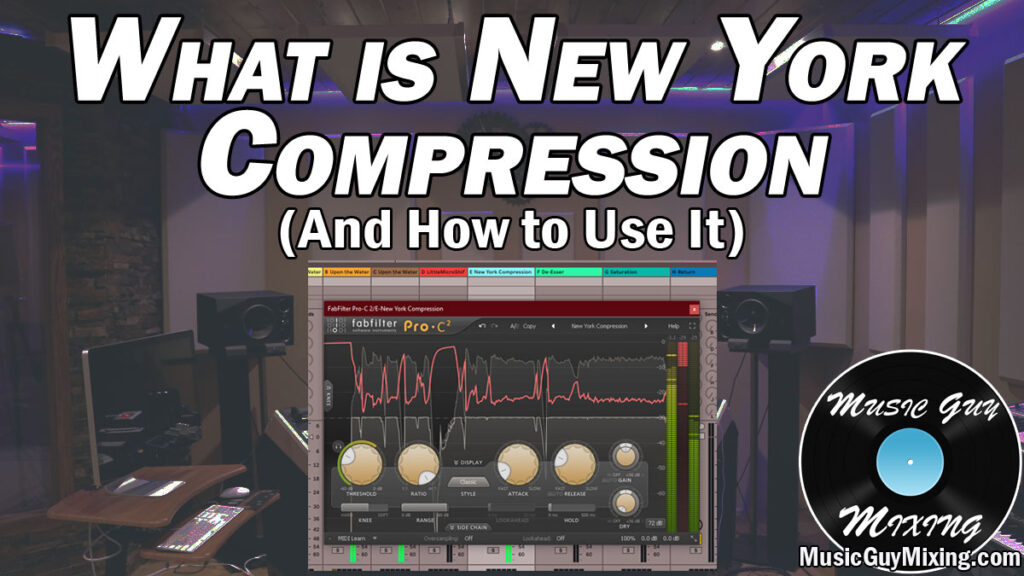
New York compression, also referred to as parallel compression, is a technique which involves absolutely annihilating your audio by way of extreme compression. The name comes from the fact that it was pioneered by and is associated with the audio engineers and producers in New York City where it became popular during the 90’s music scene.
We’re not annihilating the main or original version of any aspect of our audio, but rather a copy/duplicate instance of that audio.
The audio is completely squashed, removing all sense of dynamic range so the entire clip of audio it’s applied to is the same level. Here’s the same clip, before and AFTER New York compression has been applied:

Obviously a healthy amount of makeup gain has been applied to the green/after clip, but this is to demonstrate that fat sausage shape that audio devoid of dynamics has – this is precisely what we’re looking for with our duplicate.
We then blend in that duplicate underneath/with the original.
The result is that the sum of the two instances feels fuller, more energetic, and can yield more sustain from the audio it’s applied to, as well.
The aim is typically to “feel” the duplicate squashed-by-compression instance of our audio rather than to hear it outright.
Let’s talk how to use New York compression, including the best settings to dial into your compressor of choice itself.
How to Use New York Compression
I mentioned the aim is to apply extreme compression settings to a duplicate instance of your audio.
There are a few ways to “create” that duplicate of your audio, no matter what level you want to apply it on.
With the Compressor’s Wet/Dry Mix Control
You can dial in some New York compression directly on an additional compressor inserted at the end of your processing chain on the track in question.
Most compressors have some form of a wet/dry mix parameter which you can use to preserve the uncompressed signal (your “dry” audio).
In the case of my go to compressor, FabFilter’s Pro-C 2, rather than having a percentage dial to control the ratio, there are separate gain controls to bring the amount of gain you want for both the compressed and uncompressed signal:

There’s a few notable uses of this parameter.
One of which is to preserve some of your audio’s punch. Normally you’d have to work in some attack to offset the compression by a few milliseconds so the early transient punch can come through. By turning up the “dry” dial, you’re assured that the original, uncompressed instance of the audio is coming through to some degree.
For our purposes, we can create the parallel processing effects of New York compression directly on the track we want use it on.
First, we’d leave that “Dry” level at 0dB in the center so it maintains its normal, inherent volume coming into that compressor.
We’d then dial in the New York compression settings I’m about to share in a moment, but then adjust that top dial of the two which controls the “Wet” gain, meaning the compressed output signal, adjusting it so that we’d primarily hear the dry signal with just a taste of the squashed version.
This is a very easy way to use New York compression on any track, bus, or even your master bus while completely preserving the normal version of your audio.
Parallel Insert
You can also use the compressor carrying the New York compression settings as a parallel insert on your track, bus, etc. of choice.
Different DAWs approach this differently. In my DAW of choice, Ableton Live, you can create something called an “Audio Effect Rack” directly on whatever you want parallel processing on.
An audio effect rack allows you create multiple chains within it, essentially creating as many duplicates of that source directly in its insert area:

In the above image, we’re directly in the insert area on a vocal track where we’d insert any other plugin. I dropped my compressor with my New York compression settings dialed in at the end of my vocal chain.
You can then right click at the top of the plugin’s window in the insert area and select “Group” (or just select that plugin there and type Ctrl+G) to create an audio effect rack.
In the “Drop Audio Effects Here” section, simply right click and select “Create Chain” to create a duplicate. This will create a new processing chain without anything on it. This represents our “Dry” audio to that point. I renamed the two chains for simplicity sake in the image above – the original is called “Dry Signal” and I renamed the chain with the compressor on it “New York Compression”.
Note that in this case and unlike the last method for working New York compression in, we’d turn the “Dry” gain on the compressor itself all the way down because the other chain (Dry Signal) is representing just that. We exclusively want to hear the squashed, overly compressed signal from our compressor in this case, so that’s the only gain dial we’re concerned with (Wet).
In addition to being able to control the Wet gain directly on that compressor, we have a gain control in the Audio Effect Rack for each chain, so we can control the blend we want for this.
Again, different DAWs will approach this differently in terms of how to set this up, but this is a great way to use parallel processing of all kinds on an individual track, bus, etc.
Aux/Return Track
When we want to apply a type of parallel processing like New York compression to MULTIPLE sources, we can also set up an Aux/Return track (referred to as an Aux track in many DAWs but a Return track in Ableton Live).
Whatever your DAW calls it, you can create one then drop your effect of choice on it. I’ve got a line of return tracks set up here from reverb to delay:

For our purposes, we’d create one then drop our compressor with the New York compression settings (again, coming in a moment!) on it. It’s very important whenever using an effect on an Aux/Return track that we set the Wet/Dry to 100% wet, meaning no dry signal at all. This is because the tracks we’re blending these in via their respective send dials are serving as the dry signal.
We’d then turn up those respective send dials on the individual tracks we want that effect on to blend in the amount we want to taste.
If we wanted Microshift on a vocal track (shown on Return Track E in the above image) we’d turn up that vocal track’s “E” send dial to blend in the amount of width we wanted from that effect.
The nice thing about this method is we can apply the same effect to a lot of tracks, busses, etc. at once, making it a time and CPU saver for effects we know will be useful on multiple sources:

Now that I’ve covered the different ways to roll out ANY kind of parallel processing, let’s talk the best New York compression settings to dial into your compressor.
New York Compression Settings
Here are generally the best New York compression settings to absolutely squash your audio:

Threshold
The threshold on any compressor determines what level your audio needs to reach before anything will be compressed, or more accurately squashed in the case of New York compression.
If you’re using this on a single source, it’s simple enough to set up the threshold for parallel compression – simply set it to the quietest practical moment of your audio.
This ensures that we compress the entire dynamic range while leaving out quieter moments we won’t want to boost (like vocal breaths).
Ratio
The compressor ratio dictates how aggressively any peaks which exceed the threshold we set will be attenuated.
As you’d expect, when you want to absolutely squash any sense of dynamic range in your audio (which is the key to New York compression), we want to set this to or near the max level/option.
Some compressors refer to this as infinity; FabFilter Pro-C 2 goes as high as 100:1 which is essentially infinite as this means every 100dB which exceeds the threshold will be output as 1dB. Basically ANYTHING which exceeds the threshold will be output at the same volume, regardless of how much quieter or louder it was pre-compression.
If you want to be a bit more conservative, you can go with a 10:1 ratio which is still very aggressive and doesn’t leave a lot of nuance between the peaks, post compression:
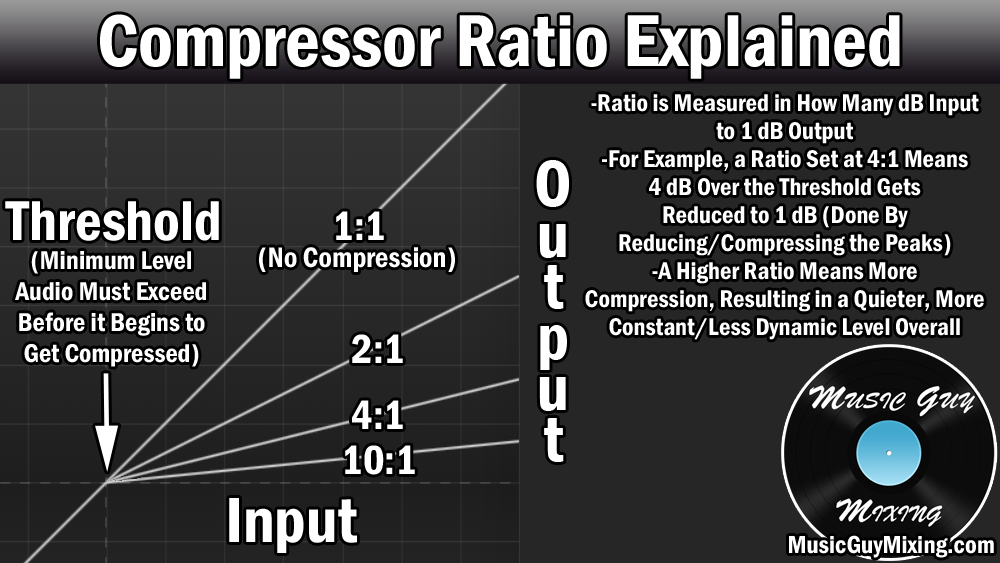
You can see how exponentially tighter that “ceiling” gets the higher you turn that ratio in terms of everything being output the same volume which is what we want with New York compression.
Attack
I referenced and alluded to this a bit when talking about that Wet/Dry blend earlier, but normally you want to add a few milliseconds of attack at least to offset the compression and let those initial transients through. This keeps your audio punchy and visible in the mix before that compressor snaps on to the remainder of the signal to smooth things out.
In the case of New York compression, we’re using this as parallel processing, or again meaning that we’re preserving the “Dry” instance of our audio, so that’s there to still help that track assert itself in the mix.
As such, we want a fast attack of less than 1ms to swallow up the entire signal and have it all get rolled into one fat audio sausage which is perfectly blendable underneath our dry audio.
Release
The release is that off ramp of returning the audio to its uncompressed state. We want a medium length release in the case of New York compression. 1
00ms works well to thicken out the audio and add some sustain but without inadvertently bringing up audio artifacts outside of the intended audio itself (very useful when using this effect as an Aux/Return track and applying it to multiple tracks with very different levels.
Wet/Dry
I mentioned this earlier, but we want the Wet/Dry ratio to be 100% wet on our parallel, New York style compressor. If there’s a simple Wet/Dry percentage dial, set it to 100% wet. If there’s individual dials for both wet and dry gain as in the case of Pro-C 2, turn the wet to the desired level while leaving the dry off completely.
New York Compression Tips
Now that we’ve talked about what it is and how to set it up with the best settings, let’s end on a couple tips on how to use New York compression in your mix and what to apply it to.
When to Use New York Compression
New York compression works well for any tracks in your mix which can benefit from more energy, thickness, or sustain.
While you can and should try applying it to anything and everything in your mix to see how it sounds, let’s underscore a few sources which it usually works very well on.
Drums
Arguably the most common application of New York compression is on your drums.
While you can use it on individual components like your kick, snare, or even cymbals, I like it on my drum bus in particular.
I have an audio effects rack set up on my drum bus with the “dry” instance of the drums with all their existing processing on them, then a duplicate at the end of the chain by way of that rack which has a compressor with the above settings on it.
A weak drum kit suddenly feels like it was recorded with a lot more life. It’s like adding an extra room mic to the performance – something about (the sense of) capturing the rawness of the performance seriously adds excitement and life to your drums as a whole, regardless of genre or the source of the drums themselves.
Vocals
I like the thickness and excitement you can add to your lead vocal in particular by way of blending in some New York compression.
Every word, every syllable, every note – everything about the vocal performance is delivered at the same level. You could argue a lot of modern producers slam their vocals with compression as it is to keep them present (it’s one of the secrets to up front vocals), but this is a great way to add energy while preserving the dynamics of the original, otherwise dry vocal.
Master Bus
I love blending in some aggressive New York compression across my entire mix by way of the master bus. This is flattening every aspect of your mix, no matter how dynamic it was going in.
As I always preach, you need to be extremely conservative when adding any kind of processing to the master bus as it is affecting the entire mix. In the case of using New York compression on it, I’m really tucking it underneath the entire mix in the epitome of “felt” rather than “heard”.
Note that this is not to be confused with a bit of glue compression on the master bus; I’ll oftentimes use the two together.
Obviously the effect of the glue compression is more palpable versus that faint but extreme New York compression.
Automate It As Necessary
One last tip. In the case of using New York compression on an Aux/Return track for simplicity and ease, you have a lot of different tracks with very different levels, not to mention dynamic profiles.
This makes accurately setting the threshold on that compressor difficult, so you’re bound to compress but ultimately boost the impact of some quieter moments through that return track, meaning you’ll obviously get a lot more artifacts when using it on an Aux/Return track and applying it to a lot of tracks.
One example I run into a lot when using it on its own Aux/Return track is in the form of boosting vocal breaths.
For this reason and unless you’re setting up a New York compressor on every individual track you want to use it on (using either of the first two set up methods described above), you’re well advised to automate the send amounts as necessary.
For instance, if you’re hearing a breath before a big chorus which you weren’t hearing without the parallel compression, automate the level of the send for that vocal down until the vocal comes in in proper.
Just pay attention after you get the blend amounts you want and address any artifacts one at a time.
I generally find it’s still more efficient doing it this way from a time and effort perspective to use the compression as an Aux/Return effect versus just setting it up on each individual track you want to send to, not to mention it saves processing power, but you need to be more vigilant in listening for these artifacts.
However you dial in your New York compression, one last reminder to not go overboard with your blend amounts.
Acknowledging it’s certainly to taste, as a general rule remember it oftentimes works best when the listener can feel its effect rather than hear it working in the mix.