
Whether you are strumming full chords or finger picking a delicate arpeggio, you want clarity, fullness, and some level of controlled dynamics to keep every note present. With that in mind, let’s cover the best acoustic guitar settings, from the start in the case of an onboard EQ on the guitar itself to the best acoustic guitar settings to dial into your EQ and compression in the mix.
Best Acoustic Guitar Settings

First, let’s talk on the acoustic guitar itself. If you’ve got an electric acoustic, one which has an output for a 1/8″ cable to feed into an amp or your recording hardware, it’s typically got onboard EQ band controls.
Acoustic Guitar Onboard EQ Settings
It will also typically have a volume control, but you typically want to leave this around the lower half of the dial or slider and instead control the input volume by way of your recording hardware to achieve gain staging, aiming for around -18dB on average with -10dB peaks when you strum or pick your hardest.
In terms of the EQ band controls, different acoustic guitars with this hardware are setup differently. You’ll typically see anywhere between two and five sliders or dials, like this:

Here, you’ve just got a nondescript dial for “low” and “high” without any indication of the frequency range each one covers. Sometimes you’ll have a low, mid, and high dial or slider, other times you’ll see additional parameters for presence for a little more top end impact or contour for some mid-shaping.
Generally speaking, you don’t want any of these to be too high or too low. The middle position typically represents a flat response, meaning no cuts nor boosts to either range.
Leaving everything flat on the acoustic guitar itself’s EQ gives you more control later in the mixing stage versus committing to a sound you might not appreciate as much later in the full context of the mix.
Of course, if you’re performing live then you’ll probably want to adjust these more to taste, especially if you’re going straight into the board versus an amp which would give you additional control, but we’re obviously focusing on recording/mixing here.
There is something to be said to getting the sound you want in the recording stage to save yourself time later if you know it’s what you’ll want. To that end, if you want a hair more brightness, you might inch the mids down 20% below the center position and the high control up 20% above the center position. Conversely, you’d do the opposite for a slightly warmer sound.
In either case, I’d typically advise that you leave the low end control flat to address that in the mix later (which we’ll talk about next).
Obviously this only applies to DI recordings and won’t affect a miked acoustic recording, but when you record both tracks like I do, it’s important to mention.
Acoustic Guitar EQ Settings
I prefer to punt and achieve the best acoustic guitar settings to the mixing stage rather than be locked into anything once I get there.
This is largely because at this point, I know what sounds good to me when it comes to mixing acoustic guitars.
This begins with using EQ to sculpt the sound of the acoustic, cutting out any room or cable related noise (depending on how you recorded it in terms of DI versus microphone(s)) or unflattering and unmusical noise. This also allows you to prop up what IS working in the tone profile of that acoustic.

It’s important before you start making EQ cuts or boosts that you understand the acoustic guitar frequency range profile.
The chart above demonstrates the tonal qualities of the acoustic guitar through each range, from the inaudible noise at the low end through to the fundamental pitch of the open strings themselves to the voice and character range to the punch of the strings themselves.
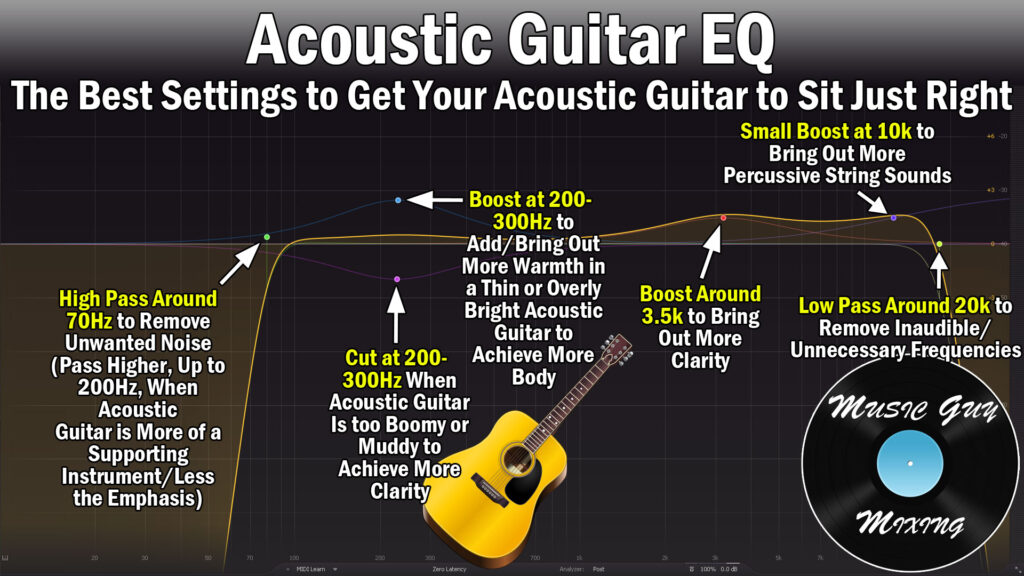
Taken from my acoustic guitar EQ guide, the above image demonstrates recommended general adjustments to make through each frequency range on the recorded acoustic guitar to get the best and most balanced tone.
Again, this is a general guide and a great starting point, one which you can run with and make each recommended move more aggressively or conservatively to achieve a brighter, warmer, or more to taste sound.
High Pass Around 70Hz
To just drill down on each move a bit more, the fundamental frequency of the low open E string on the acoustic guitar is 82Hz. Generally speaking, we don’t need anything too much lower than this and filtering this out by way of a high pass filter can clean up the entire mix.
70Hz is a good and safe place to set that filter with a 12-24dB/oct slope to both remove everything beneath that point without eating into the low end of the acoustic.
This creates room for the bass and kick (when applicable) and removes the noise on the recording which is particularly associated with mic-recorded acoustic guitar which will pick up unwanted noise.
Cut or Boost at 150-300Hz
As we get into that fundamental range of the acoustic and the open strings themselves, we can compensate for adjustments we made in the recording phase if there was too much or little low end by way of those on board EQ settings (in the case of DI recording), you can offset that here.
Furthermore, some guitars are more low or top heavy, so we can compensate for a lack or excess of low end with our adjustment in the 150-300Hz range.
In general we can just nudge this range up if we want more body. Conversely we can cut in the 150-300Hz range if the acoustic is a bit too boomy.
Dynamic Cut Around 300-600Hz (Optional)
The 300-600Hz range on an acoustic is a little tricky.
This is where a lot of the first overtones of those fundamental frequencies are beginning to assert themselves, so there’s some character here. This is also simultaneously where a lot of mud begins to cloud the tone by way of unwanted room reflections with mic recorded acoustic guitar.
Generally but specifically in the case of microphone recorded acoustic guitar, I like a dynamic EQ cut here to pull out some of those unflattering frequencies by 1dB or so when they stack up.
Boost Around 3.5k for Clarity
A small boost around 3.5kHz will bring out the clarity and top-end of the voice of the acoustic guitar. Too much of a boost here will make the tone thin, unbalanced, and at worst harsh, so subtlety is key here as I typically just aim for 1dB or so at most by way of a boost in this range.
High Shelf at 10k
The sound of the strings themselves, particularly the punch of the pick or fingers making contact with and plucking the strings manifests around 10k.
We can keep (or make) our acoustic guitar present in the mix with a small boost here to draw the listener’s ear to that punchiness of the string sounds.
I actually like a small 1-2dB high shelf around 10k as you get a little bit of the air and some pleasant clarity through this move.
Beyond that, you can low pass the acoustic as low as 15k, but 20k is a nice conservative cutoff point if you want to create a tiny touch of more headroom across the mix.
Acoustic Guitar Compression Settings
In terms of creating the best overall sound on a practical level without getting into the ear candy elements of it, the best acoustic guitar settings typically end with compression.
Taken from my overview on acoustic guitar compression, these settings are ideal for acoustic guitar:

The one caveat to these settings depends on whether you are applying this to strummed/chords or a picked arpeggiated part.
There’s typically less dynamic range and a lesser need for aggressive compression with a strummed part versus individual notes, some of which can get lost. Admittedly in the latter, you want to keep some of that dynamic range to keep the natural quality of the performance where some notes are going to be louder than others.
With all scenarios in mind, here are the acoustic guitar settings I like on compression in the mix:
Threshold
Set the threshold on the acoustic guitar compression roughly 5-10dB below the average volume of the performance/part. Err on the lower (5dB) side for a strummed/less dynamic part and the higher (10dB) side for a picked/more dynamic part. This keeps the guitar part present in the mix throughout the performance.
Note that if you’ve got a track which features BOTH strumming and picked parts, you may want to separate them onto two different tracks to compress each one differently.
Ratio
Generally speaking, a 4:1 ratio works well as a nice compromise between creating a little cohesive smoothing but without strangling out the dynamics.
As with the threshold, you might knock it down to 3:1 for a less dynamic part for more of that smoothing, and you might go a bit higher if 4:1 isn’t keeping everything up front to taste.
Knee
The knee determines how strictly the aforementioned threshold is enforced. With a 0dB knee (a hard knee) means that no compression is applied if the volume of our acoustic guitar doesn’t meet the threshold cutoff point we set.
The compression feels a bit more natural and less noticeable if you soften the knee slightly, and a 12dB knee is a nice compromise to begin smoothing out the peaks of your acoustic as the level nears the threshold.
Attack
A slower (25ms) attack offsets the compression by 25 milliseconds once the threshold is met. This is a relatively very slow attack which ensures the preservation of the aforementioned punch of the strings.
You can run this down to as short as 1-3ms and still get the front end of that bite, especially on strumming. For picked parts, you might roll it back to that 10-25ms range to help ensure every string is present in the mix (which is the point of this compression in the first place).
Release
The release is that off-ramp once the threshold is no longer met back to the acoustic’s uncompressed state. Set this to 50ms to create a subtle release and keep the listener from hearing the compressor deactivate.
Output
Important in the sense of maintaining gain staging, make sure to set the output to more or less match the input level after the compression, making up for the decibels lost in gain reduction created by that compression.
Again, those are my basic best acoustic guitar settings for getting my acoustic sounding carved and sitting just right in the mix.
Refer to my complete category devoted to acoustic guitar mixing here on this site, like tips on recording acoustic guitar, using chorus on acoustic guitar, or using reverb on acoustic guitar for a little added ear candy and further help it sitting perfectly, especially in a busier mix.