I always say that along with EQ, compression is the most important type of processing used in audio production. Whereas EQ controls the frequencies of your audio to sculpt and offer the best version of a recording, compression deals entirely with the dynamics of your audio. Here is a quick overview of what does a compressor do in mixing.
What Does a Compressor Do in Mixing

Let’s first answer the question: what does a compressor do in the context of mixing?
Either in the form of a digital plugin or piece of hardware, a compressor controls the dynamic range of an audio track/recording.
Dynamic range in audio refers to the difference between the quietest and loudest peaks of a particular track.
In this example, we have a vocal track’s waveforms visualized:

The loudest vocal peaks top out at -6dB whereas the quietest words in this section top out at -20dB.
This is a 14 decibel difference from the quietest to loudest sections of the vocal. This is no surprise as vocals are one of the most dynamic types of audio in a mix, mostly because of the expression put into the performance, not to mention the varying degrees of force and air behind the voice required to hit higher notes than others.
Bass is another dynamic instrument which has a lot of natural expression and range to it:
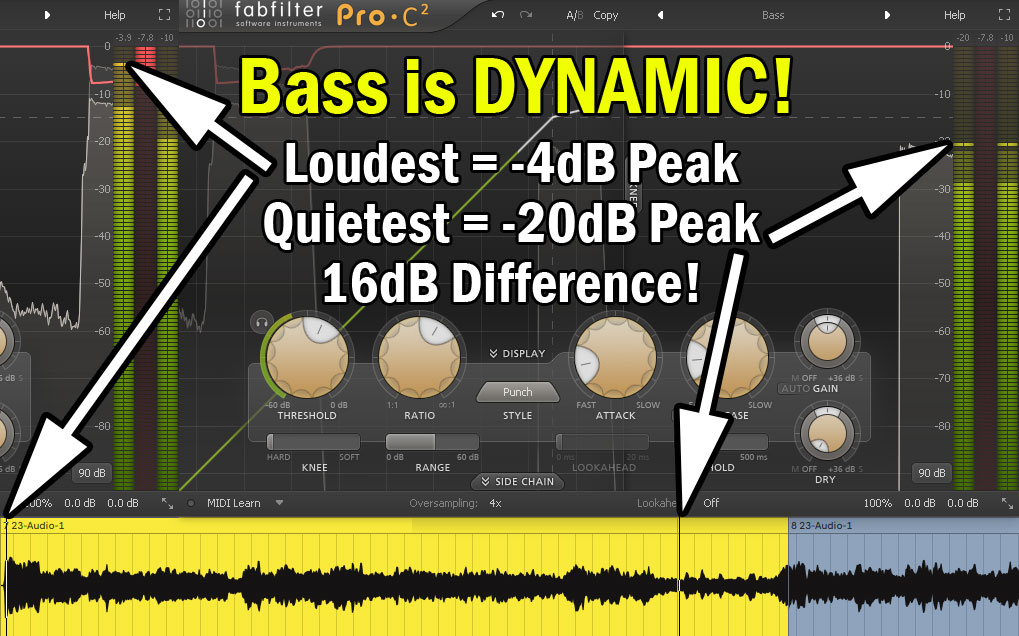
While some amount of dynamics is important in an audio recording because it keeps the instrument or vocal lively and the listener engaged, TOO much dynamic range in any track is distracting.
On a more practical level, it makes setting the level of the most dynamic tracks in our mix difficult as it will either be too loud or too quiet if left untouched as is.
This is where a compressor is useful – it reduces the dynamic range of a track so the difference between the peaks and valleys of a track aren’t as great.
As I covered in my audio compressor settings chart, it does this with a number of parameters to control the dynamic range:
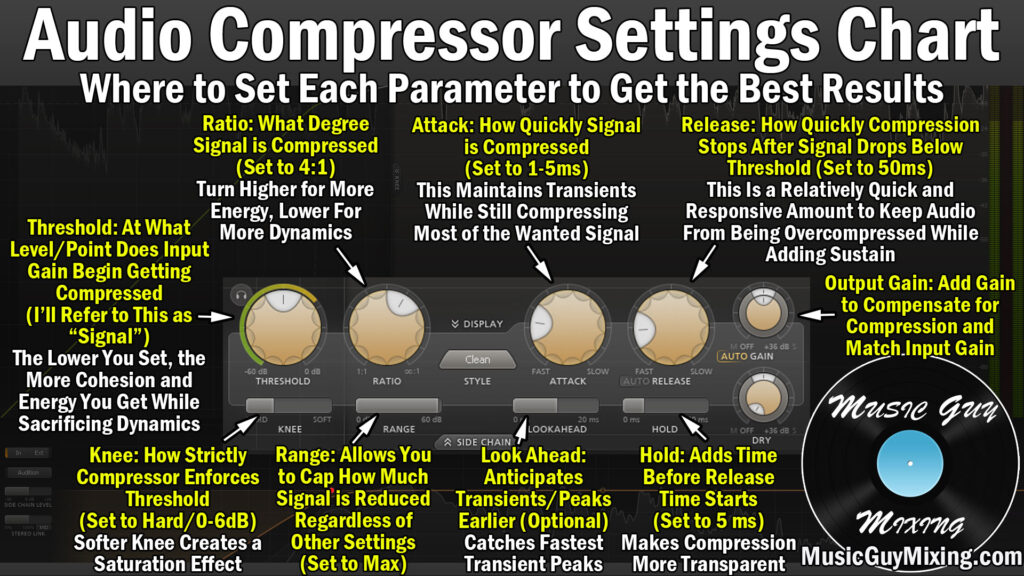
Specifically, a compressor pulls down the peaks by utilizing a threshold. Wherever we set that threshold, whenever the peaks of the audio exceed it, they get attenuated or pulled down.
The most important control on the compressor is its “Ratio” parameter.
The ratio controls the strength or degree of the compression and dynamic attenuation applied any decibels which exceed the threshold (see compressor ratio explained):
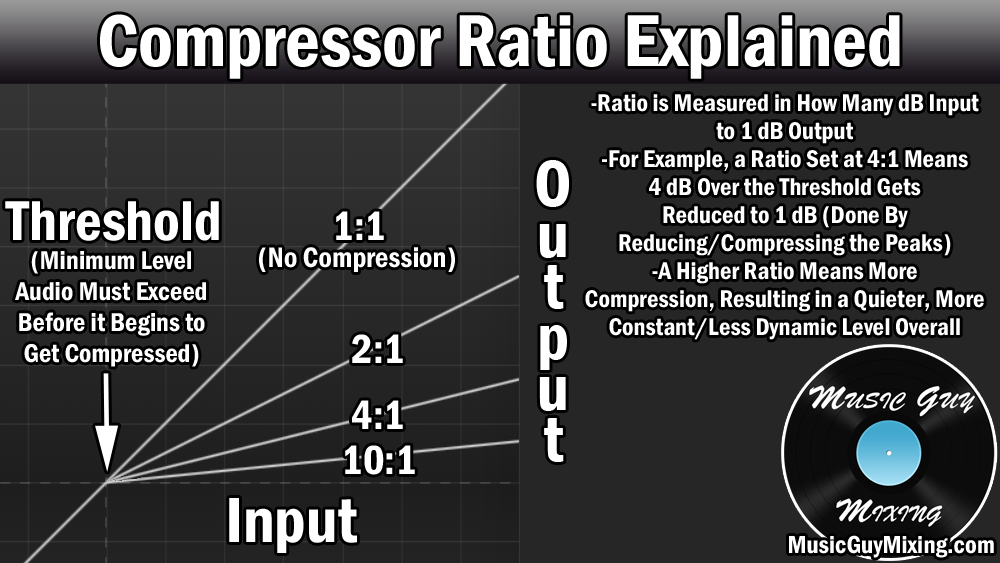
The higher the ratio, the more drastically any decibels which exceed that threshold are brought down.
With a 4:1 ratio which is an average ratio on the compressor (see the best compression ratio), every 4 decibels which exceed the threshold will now exceed it by 1dB instead.
If there’s a peak which exceeds the threshold by 12dB, with our 4:1 ratio, that 12 would be divided by 4 so the new peak would be 3dB over the threshold.
You can from the visualization how cranking up the ratio progressively creates a ceiling which gets closer to flattening the peaks of your audio.
This is the principle of limiting – applying an infinite ratio so that you create a flat ceiling wherever the threshold is set so that any decibels which exceed it are output at the same volume regardless of how much or little they exceed that threshold.
After the peaks are attenuated via compression, the entire level gets turned back up with the output gain control to offset the overall volume attenuation resulting from the compression.
Compression is important because again it allows you to achieve a more consistent level throughout your track in what was previously an overly dynamic track.
This makes setting its level to sit better in the entire mix easier and more effective. Compression also gives your track a lot more energy by way of that more consistent level.
Speaking of energy, there’s a technique I’ve covered called parallel compression in which you duplicate a track then absolutely crush the dynamics with aggressive compression/bordering limiting settings, then quietly blending that high energy, dynamic free copy of your track underneath the original:

Of course there is such a thing as TOO much compression. I alluded to this earlier; we want some dynamic range intact in our audio as it sounds more natural and keeps the listener more engaged with that track.
Whether it’s a specific track or the entire mix, too much compression results in the fat, sausage-like waveform for a track which is devoid of life entirely:

With virtually no dynamic range, the listener’s ears subconsciously became exhausted and lose interest in the track or mix/master/song.
As such, compression is about walking a fine line in striking that balance of just the right amount of dynamic range to keep the listener engaged and keeping a track present and energetic in the mix.
With this in mind, check out my many compression tutorials and specifically grab my free compression cheat sheet for detailed graphics which show the ideal settings for compressing every single instrument in your mix.