
Whether the piano in your mix is taking the starring role or is more of a supporting piece to fill in some gaps, this mixing piano cheat sheet will cover how to yours sounding its best in your next mix.
Mixing Piano Tutorial
As I typically do in my instrument specific mixing tutorials, let’s go from the start to the end of your processing chain on your piano in this mixing piano tutorial, beginning with EQ.
Piano EQ
We can significantly and appreciably improve the sound of our piano by beginning with dropping an EQ of your choice at the start of our processing chain on our piano track(s).
As always, piano EQ is all about cutting out what’s not working and, in some cases, propping up what is working to sculpt the tone of our piano from top to bottom for the better as this snapshot shows:
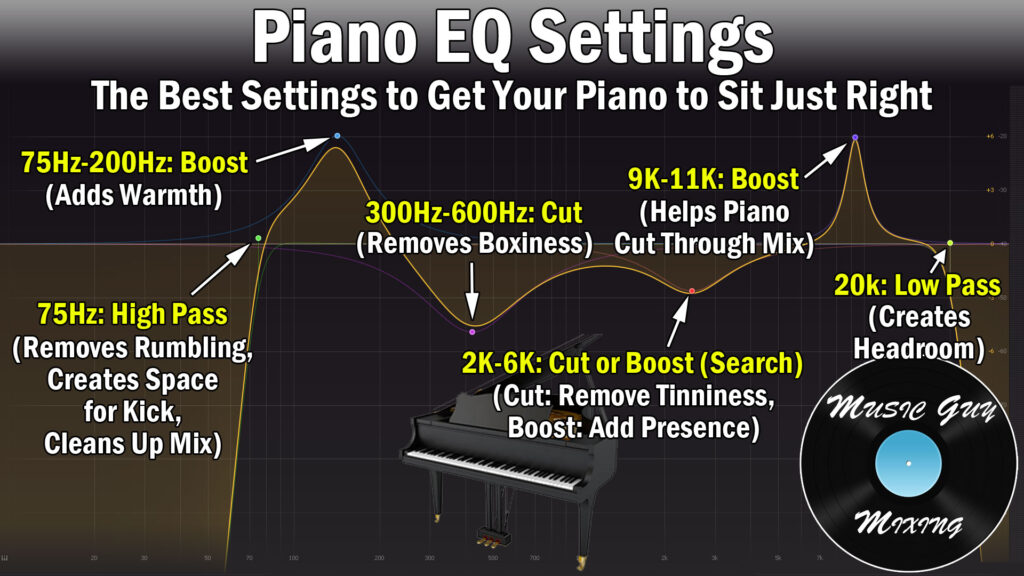
Let’s briefly go through each point of interest to show why I recommend cutting or boosting, and the effect it has on the tone of the piano.
High Pass at 75Hz (Sweep)
High passing your piano sculpts the lower edge of the lower end of your performance. Note that the lowest practical note on a traditional full size 88 key piano is 27.5Hz, the A0 key.
An octave up is double that frequency at 55Hz, so this is the rule which is the most subject to change as you obviously don’t want to cut into the body of the tone of the piano by cutting into actual notes in the performance.
As such, you’ll want to play the part of the performance in your mix which plays the lowest notes when setting this filter. While 75Hz is listed as a decent starting point, you may need to bring it down.
Regardless, find that note and sweep the filter up until you hear that note begin to change, then back it up 5Hz or so. This will filter out a lot of unwanted boomy noise associated with the low end of the piano.
This is the first instance where I’ll advise that you adjust based on the usage of the piano in the mix.
The general rule I follow is if the piano is the main instrumental piece (think vocal + piano mixes), then I’ll filter more conservatively, pushing that cutoff point lower to ensure I’m fully preserving the weight of that low end.
Alternatively, if the piano is more of a supporting player in a denser mix and I’m focusing on the clarity of the tone and its keys, I’ll filter higher, potentially significantly so.
Boost 75-200Hz for Body/Warmth
The body of the piano typically resides more in the 75-200Hz region. This is where the more practical lower end of most performances is played, so a small, wide (in terms of the Q setting) 1-2dB boost works well to anchor and root the piano in your mix.
Once again, I’ll approach this boost dependent upon how I’m using the piano in my mix.
If the piano is more of an accent, I’ll forgo the boost. If it’s the star of the instrumental, I’ll give it that nice wide boost for the weight.
Cut 300-600Hz for Subtractive EQ Creating Clarity
Cutting in that 300-600Hz pocket is a nice subtractive EQ for creating clarity in attenuating the influence of those first overtones of the body.
As I covered in my recent piano frequency chart, there’s a lot of boxiness which builds up in that 300-600Hz range:

A cut here can create some clarity by way of that subtractive EQ, emphasizing the remaining frequencies while also carving out those unflattering sounds.
A dynamic cut to achieve 1-2dB attenuation at most is less invasive and more of a proportionate move, so I tend to prefer setting up a dynamic EQ band here and adjust its threshold to deduct 1dB or so max from the performance only when there’s a buildup here rather than just uniformly cutting across that spectrum.
Adjust 2-6k as Necessary
I generally leave 600Hz-2kHz untouched as there’s a lot of the voice of the piano in this range and any adjustment plus or minus tends to sound unnatural here.
2-6k on the other hand can be adjusted as necessary.
If you’ve got a kind of tinny sound which can crop up on some pianos and some recordings, a dynamic cut around 4k can smooth that out.
If you want some more presence from the piano, try a small, wide boost around 4k of about 1-2dB.
Going too far in either direction will make the piano lose it’s life or sound too thin or unnaturally sharp when cutting or boosting, respectively.
Boost 9-11k for Transient Boost
The transient punch of the piano of the hammers hitting the strings is what precedes the rest of the tone of the piano. This is what helps draw the listener’s ear to that instrument in the mix.
With that in mind, a 10k boost can help make the piano a bit more visible in the mix.
Low Pass at 20k (Conservative)
Feel free to connect the 10k boost with a high shelf around 13k or so to bring out some top end crispness before low passing around 15k or as high as 20k on the more conservative end.
Use Compression to Add Sustain
We can bring out some additional subtle but welcome sustain to the piano by way of compression.
Here is a snapshot of my piano compression cheat sheet:
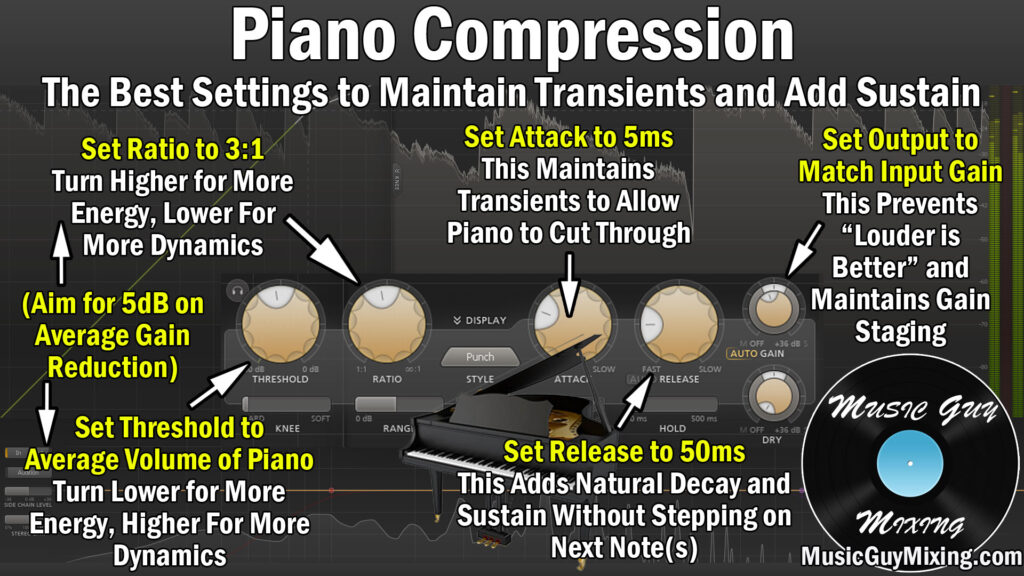
As you can tell from the 3:1 ratio, you don’t need to compress too aggressive. I like to pair this with a threshold which is set around the average level of the piano.
An attack of 5ms is more than enough to let those initial punchy transients of the hammers on the strings pass through before the compression triggers, so the transient presence isn’t affected.
Finally, I like a release of 50ms to create a natural off ramp for the compressor to allow it revert to its uncompressed state once that threshold is no longer met. This helps to keep the piano lively and responsive, not to mention keeps the compressor from being engaged too long.
Aiming for about 5dB of gain reduction on average will help to create a thicker piano tone with more back-end sustain, all by way of the compression.
Layer Octave(s) for Thickness or Presence
Even after the EQ or compression, we might still find our piano could benefit from more thickness or presence overall in the mix.
In the case of MIDI piano, I like to copy and paste an octave above or below to add presence or thickness to the piano, respectively:

After you’ve duplicated that part an octave up or down, you want to drop the velocity (volume) for that duplicate by about 50% of the original level.
The listener should barely be able to tell that it’s there, but this helps the performance to sound fuller regardless of how you’re using the piano in the mix.
Panning and Stereo Width
How you treat your piano’s panning and width will vary depending on how it was recorded and how you plan on using it in the mix.
Generally speaking, piano is recorded with a pair of microphones or a single omnidirectional microphone (see my microphone pattern guide), in either case positioned to emphasize and capture the different ends of the piano.
We can then spread these two (or more) tracks wide, panning the low end microphone track on the left and conversely with the higher keys on the right.
This easily recreates the natural range and stereo spread of the piano for the listener in the mix.
In going back to how you plan on using the piano in the mix, in the case of a lush piano-centric song, you likely want that piano to encompass the full stereo field.
Conversely, if you’ve got a dense mix and the piano is more of an accent, you may want to shrink the stereo width of those tracks.
You can drop a utility type plugin to reduce the stereo width or even set it to mono, stacking those tracks together as I detailed in my audio panning guide:

In a busier mix, the piano works well panned opposite the hi-hat because its brightness contrasts effectively against the presence of the hat as I pan the guitars wide.
If you need even more size on your piano and want it to feel enveloping for the listener, I like to blend in some Microshift via a send from an Aux/Return track.

I actually use this to simulate some left and right channel width on multiple tracks, hence its use as an Aux/Return track, but anything you want to widen or thicken up, this is a great little tool for doing that.
In the same vein, I also put together a tutorial on how to use piano chorus to thicken or widen your piano, but I find Microshift accomplishes the same task but without the artifacts or in other words is a cleaner alternative.
Reverb
If you don’t mind sacrificing a little mix cleanliness on your piano, you may want to work in some reverb to add some depth in addition to width.
Here’s a snapshot of the starting settings I like to work in when I want some depth and added size on my piano:

This is taken from my entire tutorial on how to use reverb on piano, so refer to that for more information.
Note that the decay/delay time/size of your piano reverb will be influenced by the tempo of the song and the complexity of the mix.
Again, the above settings of 1.5 seconds with a predelay of 20-30ms are simply a great jumping off point. Your mix’s complexity will also dictate the color/character settings and width that you’ll ultimately go with.
Set your reverb to 100% wet in the case of using it as a send, then blend it in to taste and adjust the settings to find the right balance for your mix.
As with any reverb, I do recommend that you filter your reverb’s signal with the onboard EQ filter settings or (in the case of an Aux/Return track) following it up with an EQ with filter points akin to those dictated by the Abbey Road Reverb trick.
This creates the depth you want on the reverb without clogging up or otherwise suffocating the highs and lows of your mix, keeping them clean for the instruments which need it.
Mixing Piano Tips
- Via EQ, roll off 75Hz, boost 150Hz, and cut 450Hz, to sculpt the low and low-mid frequencies of your piano to clean it up and add warmth.
- Adjust 2-6k to control tinniness or add presence as necessary.
- Bring out the transients of the piano’s hammers hitting the strings with a boost around 10k.
- Compress with a 3:1 ratio and set the threshold around the average level of the piano to smooth out the peaks and add some welcome sustain on the back end.
- Match a 5ms attack to preserve the transient punch with a 50ms release to keep the piano lively.
- Layer a duplicated octave up or down if possible, buried and blended beneath the main notes and octave for fullness.
- Allow the recording setup of the piano as well as the mix itself to dictate the panning.
- In the case of a pair of stereo mics, pan one hard left and one hard right to recreate the natural stereo spread of the keys from the bass to treble ends.
- In the case of a busier mix where the piano is more of an accent, narrow the width if necessary and pan it midway off to one side opposite the hi-hat on the other side in the same spot.
- Add width by way of chorus or a plugin like Microshift via a send.
- Blend in reverb underneath the piano with a 20-30ms predelay and 1.5 second decay/size time as a jumping off point, cleaning up the reverb via 600Hz and 6000Hz filters on either side.