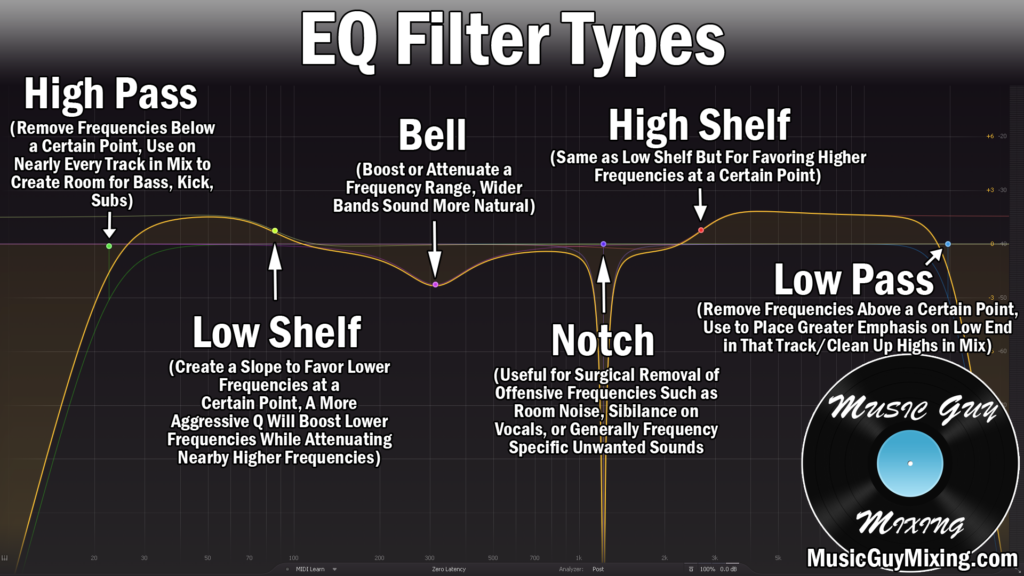
I talk a lot about the importance of high passing your vocals as an effective way to both clean up the vocal not to mention create space for low frequency instruments in your mix which need dominion over these lower frequencies. On the other end of the frequency spectrum, the top end, your vocal or better said your mix can benefit from a high frequency cutoff, so let’s talk where to low pass filter on vocals.
Low Pass Filter on Vocals
There are a couple different ways to approach it when you low pass filter on vocals.
The one I generally opt for is the conservative approach.
In other words, I recommend placing your low pass filter at 20k on your vocals:

Additionally, I like a slope for that low pass filter of about 24dB/oct for striking a balance between creating a natural cut but without cutting too aggressively below that point.
20k works as an entry point to sweep lower if you want, or alternatively you can leave it in place.
Typically when we’re talking about the highest audible frequencies in the singing voice, we’re talking about the “airy” quality of the vocal which exists above 10k. This manifests as a barely audible openness which you can bring out via a high shelf as I detailed in my complete vocal EQ guide.

With a 10k difference between those final two 10k and 20k adjustments, 20k for that vocal low pass filter is admittedly conservative because we’re not worried about it pulling down that shelf or cutting into the air of the vocal prematurely.
That’s the point of that 20k cutoff, though. You don’t need to worry about it eating into the top end crispness of your vocal as we’re instead rolling off at the top end of the frequencies we can actually perceive/hear. That’s an important distinction to point out, as well – the human ear can generally only perceive between 20Hz to 20kHz. There’s literally nothing to hear about 20k, so why not set it there to ensure we’re only cutting what we can’t hear.
Additionally, some quote the “air” frequencies of the vocals as starting a bit higher, into the 12-14k region. 20k for a low pass vocal filter ensures we’re preserving that top end crispness without worry of taking anything away from what should be the “star” or otherwise the focal point of our mix in the vocal.
This makes 20k the perfect set-it-and-forget-it solution (which I’ll always take).
Lastly and unlike the high pass filter on the vocal which we’re using in equal measures to create space for the instruments which need those low frequencies, not to mention filter out room noise and other unmusical frequencies on the vocal, the vocal is one of the instruments we’re low passing OTHER instruments FOR.
It’s up there with the top end of cymbals, but in other words, we’re not trying to create space for OTHER instruments on the top end through our vocal.
The TL/DR on where to set a low pass filter on your vocal is 20k. Again, you can sweep lower, but it’s difficult to palpably “hear” the crispness and air in the highest end of your vocal.
20k doesn’t sacrifice anything and it creates a bit of mixing headroom which goes a long way in creating (better sounding) louder mixes and masters when all is said and done.
One final tip – you may want to cut more aggressively on backing or otherwise more supporting vocals, going down to 15k in order to create a little contrast and more space for/an emphasis on your lead vocal(s).
Low Pass Filter Vocal Tips
- A low pass filter on your vocal removes top end noise or more practically creates a bit of headroom for your mix.
- Set the low pass vocal filter at 20k with a 24dB/oct slope to create a natural cut which doesn’t cut too aggressively below that point.
- This preserves the air and openness in your vocal.
- You can sweep lower, but note that the top end crispness of the vocal is as much about “feel” as hearing it (hence 20k being a conservative cutoff point which works well).
- You may want to cut more aggressively on some backing vocals to create more of a contrast and emphasize the lead vocal, as well.