A good bass tone is achieved both in the recording and mixing stages, so let’s cover the best EQ settings for bass across the board.
EQ Settings for Bass

Let’s begin where the bass sound begins itself, talking the best EQ settings for bass in the recording stage.
Best EQ Settings for Bass in Recording
Before I cover the best EQ settings for bass in recording, refer to my quick guide on how to record bass.
This compares recording bass DI versus amp methods as each have their pros and cons. Recording DI generally gives you a cleaner sound, not to mention gives you more options later on if you want to re-amp or apply some kind of bass amp simulator to it.
Micing a bass amp blends in the sound of the amp/cab, as well, not to mention the sound of the room:

Regarding the on best EQ settings for bass on the amp, as I covered in my guide on how to EQ a bass amp, it’s important to have an understanding of the profile of the frequency range of the bass itself:

The fundamental frequency range of the open strings themselves ranges from roughly 41Hz to 100Hz, going to roughly 196Hz for that 12th fret on the G if you want to think of that as the practical fundamental range of the bass. Above that, you’ve got character and grit in that 600Hz-1.5kHz range where the overtones begin to really assert themselves, some clarity from the tone between 1.5-4kHz, and the punch of the strings in the 4-10khZ range.
We’ll talk more about this when we get into the mixing portion in a moment, but in getting back to the onboard EQ settings, you typically have a few dials for controlling each range.
Bass
The name may vary, but the bass knob on a bass amp typically controls the aforementioned fundamental frequency range of the bass, or that aforementioned 40-200Hz band.
Typically represented on a scale of 0/1-10, 5 is that middle position which usually represents a flat approach to that band. In other words, while there are some exceptions, leaving the bass dial or controller at “5” means you’re not cutting and you’re not boosting.
You generally want to leave the bass dial flat or at that 5 position to keep your tone from getting overly boomy. Just as importantly you probably don’t want to cut this.
An exception where you might adjust it relates to the microphone position. Closing miking the bass to get right up on that speaker, you might bump it up to a 6 to get more fullness to balance well with the cleaner, drier sound you get from the close proximity. Generally speaking though, flat works best.
Mids
Moving up and acknowledging different amps address different ranges in a variety of ways, but the “Mid” or “Mids” control typically addresses 300Hz-2kHz (though you should consult your amp’s manual for confirmation).
I like a small cut in the mids to open up the tone by way of a bit of subtractive EQ, slightly nudging the emphasis of the tone to the low and high ends.
This helps to clean up a bit of the mud in the tone without sacrificing its character.
“4” works well for just a tiny bit of sculpting for the good.
Treble
As mentioned in the frequency profile chart of the bass, we get into the transient bite of the sound of the strings on the high end.
The “Treble” control on the bass amp controls 2kHz and up, so this is that clarity and presence of the bass as well as the punch from those strings.
This helps the bass assert itself in the mix and brings in more of the metallic edge to the tone, as well. I like a tiny boost here to complete the sculpted, contoured tone across the board, so “6” works well.
Best EQ Settings for Bass in Mix
With our recorded bass tone, it’s time to turn our attention to the mix so let’s take a look at the best EQ settings for bass in the mix by way of your EQ of choice.
Here’s a snapshot of the bass guitar EQ settings I recommend, particularly if you didn’t get to sculpt your bass tone during the recording stage as well as you would have liked, if at all:
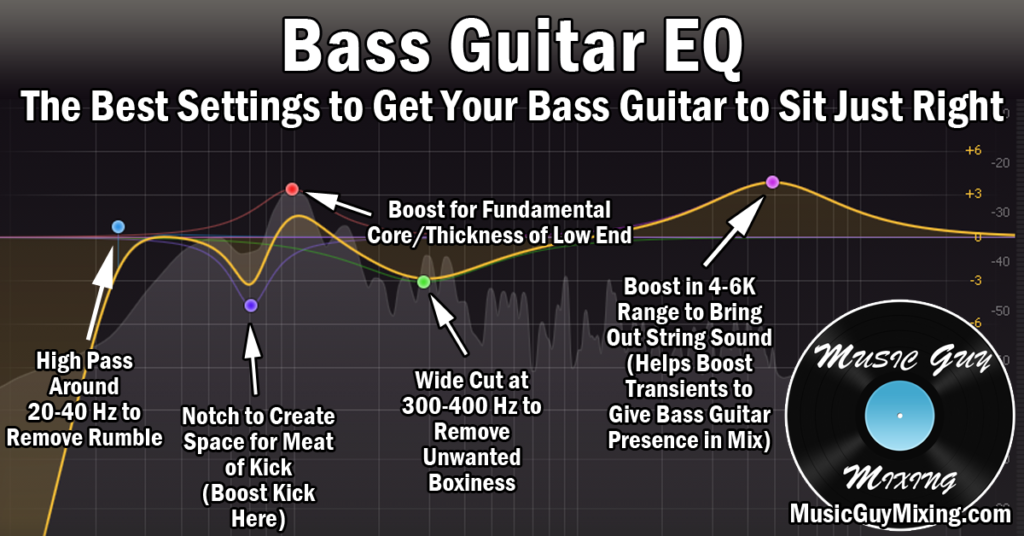
High Pass Around 20-40Hz
As I mentioned, the fundamental frequency of the open E string itself is 41Hz. As such, we can generally get away with a high pass filter to remove the lowest end noise just below that.
If you want to be conservative, aim for around 30Hz with a 12-18dB/oct slope. This ensures the practical, lowest end of your bass tone remains fully intact.
At the same time, we’re removing inaudible noise which can help clean up the tone and just as importantly add mixing headroom for a better sounding louder mix when all is said and done.
I recommend high passing every single track in your mix to achieve an appreciable difference in noise cleanup and headroom, so check out my free EQ cheat sheet on the exact frequency points to do this on every instrument in your mix.
Duck at Fundamental of Kick
One of the most important aspects of any mix and certainly in low end mixing is to get the kick and bass to work together.
They both share a very similar fundamental frequency range and neither can or should generally be panned off center, so ducking the bass out when the kick triggers helps to clean it up and allows the kick to be better heard in the mix.
You can do this by sidechaining your bass to your kick with sidechain compression.
You can also do this with a more targeting approach via a dynamic EQ, simply creating a dynamic cut on the bass around the 65Hz where you typically find the body of the kick, then sidechaining that EQ on the bass to the kick so it exclusively pulls down that 65Hz of the bass when the kick triggers.
Cut/Boost at 100-200Hz as Necessary
The upper range of the fundamental on the low end contains a lot of practical notes as well as overtones of the open strings themselves. This is where you get a lot of the body of the bass tone, so you can cut or boost here are necessary to drive the tone.
If the bass is a bit too boomy, try a small dynamic cut to take a decibel or so out at most. If you need more of that body, try a small 1-2dB boost.
Dynamic Cut at 400Hz for Boxiness
The frequency range profile chart showed that you get some wonkiness and boxiness in the tone between 300-600Hz.
Similar to the small adjustment on the amp itself, I like a dynamic cut here (particularly if this consideration wasn’t taken in the recording phase) to control this range just a bit.
Again, you shouldn’t need a big cut; something in the range of 1-2dB at most should help to sculpt and clean up your tone while subtly placing a greater emphasis on the lower and higher ends of the tone.
Speaking of which…
Boost 4-6kHz for Punch
The metal of the strings and particularly the percussive sound of the pick or finger against them asserts itself in that 4-6kHz range.
These transients are the first things which the listener hears as it relates to the bass as it precedes the lower frequencies. This draws their attention to the rest of the tone which subsequently follows it milliseconds later, keeping the bass present in the mix.
A small boost in the 4-6kHz range helps keep your bass punchy and present, so look for a small 1-2dB boost at most to achieve just that.
If you like, you can roll off the top inaudible end of the bass with a low pass filter around 10kHz or so, pushing it higher up to 12-13kHz if you want to approach it more conservatively. Like we did with our high pass filters in creating space for the bass, kick, and similar low end heavy instruments, low pass filters help to create space for the high end focused instruments which need this space (not to mention it helps to create a little extra headroom, especially when applied across your mix as necessary).