
A vocal list can come out in a vocal recording for a number of reasons, even when the singer doesn’t have a lisp. Microphone placement, room reflections, certain lyrics, and certainly yes a lisp prone singer themselves can all account for this distracting and unflattering noise on a vocal recording. Thankfully there is a certain frequency you can target as well as other steps you can take to fix a vocal lisp or prevent yourself from accidentally giving the singer one in the mix.
How to Fix a Vocal Lisp in the Mix

Boost ~7.5k via EQ
A proactive way to correct an existing lisp which is embedded on a recording is to actually bring out more of the sibilant qualities of the vocal.
Normally we think of sibilance as a bad thing, in fact I did an overview on how to treat vocal sibilance in the past.
If you’re not familiar with the term, these are those exaggerated sounds associated with certain consonants, especially the “S” sound. These sounds can be grating and distracting on a vocal.
In an audio production context, sibilance is the opposite of a lisp. I’ll get into why this is in a moment, but as I covered in the aforementioned vocal sibilance treatment guide, it exists in the 5-8kHz region give or take (it can be found higher on certain vocalists).
As such, a surefire way to correct a vocal lisp in the mix that’s already on the recording is to create a small boost around 7.5k to attenuate the lisp by adding some corrective bite in the right spot:

I like a 1-2dB boost with a relatively wide Q setting (somewhere between 1 and 2) at or around 7500Hz. Create the band and sweep around as you loop an especially lispy part of the vocal to find the sweet spot where it’s benefiting the most.
Note that you can make this a dynamic boost if you’ve got a dynamic EQ so that it more exclusively targets those S sounds and other consonants you get a more prominent lisp on.
If your vocal could benefit from a bit more presence in general, there’s no harm in leaving this as a conventional/static boost.
Set a Limit to Your De-Esser
Typically the problem with a vocal lisp in the mix doesn’t manifest until you start adding processing to the vocal (see my complete vocal chain).
Similar to how a nasally voice is the other side of a hollow sounding vocal from a frequency perspective, sibilance and lisp are opposite sides of the same coin, in this case around that aforementioned 7.5kHz area.
If you attenuate too aggressively in this area (typically to address sibilance), then you can end up CREATING the effect of a lisp on the vocal when it’s not inherent on the vocal itself.
For this reason, I like to keep whatever processing I’m using to address a sibilant vocal to conservative settings.
This means setting the range on my de-esser (when used to treat sibilance) at or below 6dB to minimize either an emphasis on an existing lisp or to avoid creating one. This is the setting which dictates the max amount of gain reduction to the affected frequency range which can be created with the threshold.
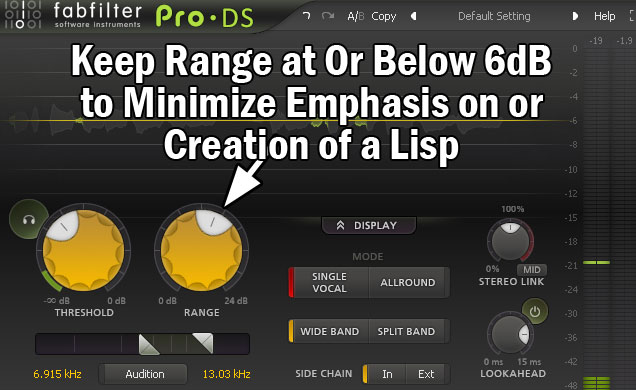
Strictly speaking, if you’ve got a vocal lisp, you generally won’t also have an issue with sibilance. The problem is generally one extreme or the other.
Over de-essing (or multiband compressing, EQing, or dynamic EQing to attenuate this frequency range) a vocal shaves down those “S” and similar consonant sounds to a fault to the point that you lose the clarity and punch and it manifests as a lisp.
Add More Attack to Your Compression
Speaking of punch and in the same vein, one final way to avoid a vocal lisp in the mix is to pay attention to the attack on your compressor.
The attack controls how quickly compression engages once the threshold is met. Setting it to as fast as it goes/instant/zero attack means instant compression.
I always preach the importance of maintaining some attack to delay the compression for a few milliseconds. This allows the higher frequency transients which move faster and hit the ears first to pass through before the compression engages and the rest of the sound’s dynamics are managed.
If we set the attack on a vocal compressor to be instantaneous, it swallows up the punch of those transients.
In addition to making the vocal less visible and not hit as hard, it’s a similar effect to turning down those higher frequencies, potentially resulting in a flatter, lispier sounding vocal.
As such, make sure you add a few milliseconds to your vocal compressor’s attack both to keep your vocal punchy but also minimize the effect of a vocal lisp on an otherwise clean sounding vocal.
This applies to whether you’re using a uniform compressor (meaning non-frequency dependent), a multiband compressor, or a dynamic EQ.
To bring it full circle, this also applies to affecting that 7.5k region via a normal EQ.
Attack isn’t relevant in this case, but it’s a good reminder that cutting in that region can lead to a vocal lisp, and more so with certain vocals over others.
These tips should help you keep your vocal sounding crisp and natural whether the lisp was present on the recording or not.
Vocal Lisp Mix Fixes
- For an existing vocal lisp on the recording, try a small 1-2dB boost around 7.5kHz with a 1.5 Q setting.
- Sweep around to find where that boost is mitigating the lisp effect as much as possible.
- Keep the maximum range or gain reduction on your de-esser to 5-6dB to avoid overly attenuating the sibilant rich consonant sounds which lend themselves to creating lisp sounds in the mix when attenuated too aggressively.
- Avoid instant or too fast vocal compression attack to allow the transient punch of the vocal to come through clear and thus avoid a similar lisp effect as before.
- Remember the same rule applies whether you’re using a uniform compressor, multiband compressor, EQ, dynamic EQ, etc.
