Sidechain compression is all about compressing and controlling the dynamics of one track based on the behavior and dynamics of another. We can use this in a number of ways in our mix, so let’s talk how to use sidechain compression, both getting it set up and the applications of it in your mix.
How to Use Sidechain Compression

First, let’s talk how to set up sidechain compression. I mentioned this a second ago, but this involves compressing one track based off of the dynamics and volume of another track. Let’s go step by step for getting it set up.
Step 1 – Drop a Compressor on the Track You Want to Compress
The first step is applying a compressor to the track you want compressed.
To use a real world, practical example, if you want to compress your bass whenever the kick drum triggers, you’d drop the compressor on the bass track.
Most compressors feature a sidechain capability, but not all. You can always use the stock compressor which comes with your DAW if whatever your otherwise go to compressor doesn’t have that functionality.
Step 2 – Set the Source in the Sidechain Area
In Ableton Live, you can click on the arrow to expand plugins to show additional parameters in some cases.
In the case of a compressor, this gives you sidechain area where you can control the source which the threshold you set will follow:

I’ll talk more about this in the next step, but again, in the case of sidechaining a bass to a kick drum, you’d select your kick track in the “Audio From” area in the case of Ableton Live (like shown above).
They’ll give you the pre or post FX option; the “Post FX” option means it takes the level of the kick in this case with all of its own processing in mind. So any EQ, compression, etc. which are affecting the volume of the kick as we hear it are taken into account – this is generally the setting you want for that reason.
Step 3 – Adjust the Compression Settings
Now you just need to set up the compressor to get the gain reduction that you want on your target.
While most of the parameters are relevant to the track we’re compressing, remember that the threshold is controlled by the source.
I put together an overview on how to sidechain compress in Ableton Live with some settings which generally work well for gaining a little control over your target track:

Depending on your intent with the sidechain compression, I recommend setting the threshold to a level which includes every note or hit from that source track.
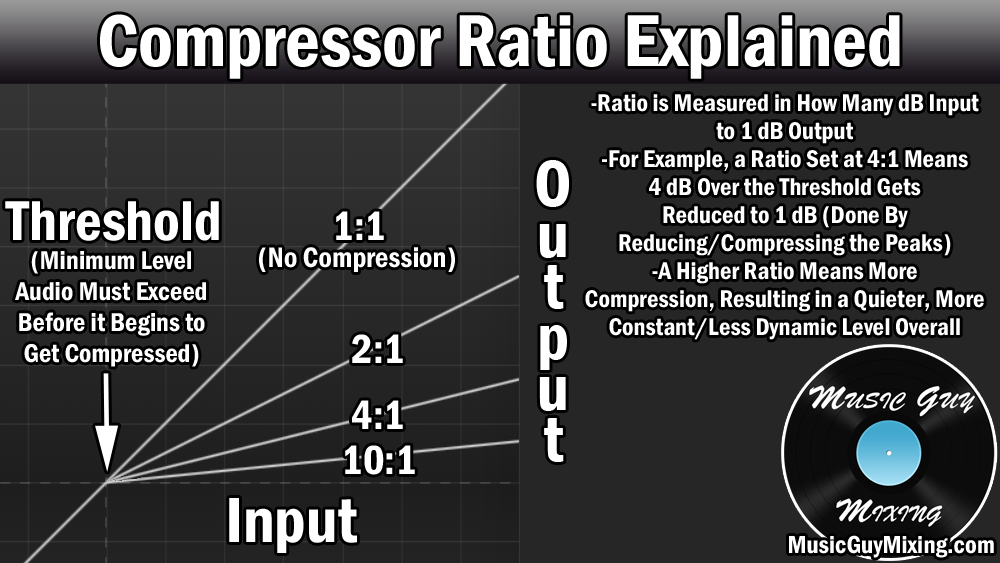
The ratio is the main driver of the compression as always. Turning this up will significantly attenuate the impact of the targeted track while the source is playing. More specifically, the target track will be compressed while the source track is playing loud enough to trigger the threshold.
When to Use Sidechain Compression
As I covered in how to use sidechain compression, it’s easy enough to set up. The more practical question might be why use or WHEN to use sidechain compression?
A few practical applications in your mix might be…
Low End Mixing
I’ve been referencing this as the example as it’s one of the most common applications of sidechain compression, but sidechaining bass to kick can significantly improve the low end of your mix.
The kick and bass overlap in and share a similar fundamental frequency range. Since you typically want both of these tracks in the center of your mix, panning to avoid a frequency conflict and overlap isn’t an option.
“Ducking” the bass for the split second by way of sidechain compression while the kick triggers, even by a few decibels, can help prop up the kick so that it doesn’t get lost behind the bass.
While you can use sidechain compression, I talked specifically sidechaining a dynamic EQ from the bass to the kick as one of the keys in my low end mixing tutorial. This specifically ducks the core, fundamental frequency that is the body of that kick on the bass while leaving the rest preserved for a more transparent fix than sidechain compression which still gets similar results.
Obviously this exact same method doesn’t just apply to the low end as you can use it to duck one of any two (or more) tracks which are sharing a a similar space in the mix but can’t be separated either by panning width or reverb added depth.
Volume Automation
Another practical use of sidechain compression is to chain anything in your mix that you want ducking out in relation to another instrument. This might not be so much because of a frequency conflict but more the desire to add more life into a track.
Volume automation refers to actively setting up the volume of a track, bus, or entire mix to go up and down to either adjust as the situation calls for or to simply keep the listener engaged.
In the latter case, you can manually do this (or use a tool like a vocal rider), or you can simply chain whatever you want to control to another source in your mix to automatically create some low effort automation, adding some life to that track.
In this case, you’d use a much lighter ratio on that sidechain compressor and back the threshold up more, depending how aggressive you wanted to control the volume for that track.
Ear Candy
An extension of that last point in some ways, we can sidechain compress anything in our mix to create some interesting artificial and extreme ducking on a track of our choice for some interesting aesthetics.
A good example is when you have a synth or any instrument holding an extended note or notes. Sidechaining it to the entire drum bus can result in some very frenetic real-time ducking which can make an otherwise vanilla sounding part suddenly sound much more interesting.
It’s a low effort way to make the listener think you’re putting a lot more production into it than you are when all you’re doing is sidechaining that note’s track to a high energy track in your mix with a lot of dynamics and cranking up the ratio and down the threshold.
Aside from the more practical applications, sidechain compression is another technique in mixing whose only limitation is your imagination, so don’t limit yourself there and feel free to experiment as you never know if you might love the results.