Whenever you have a stretch of recorded audio in your mix, long or short, this is referred to as a clip. Every audio clip in your mix can be selected and manipulated in a variety of ways. Many digital audio workstations (DAWs) that we record or mix music in allow you to adjust the pitch or formant of the audio or warp the clip to be longer or short, but virtually all DAWs allow you adjust the clip gain.
This is the level of the audio before any processing happens to it, giving you more control of it at the start. Let’s talk how you to adjust clip gain and just as importantly why do it.
Why Adjust Clip Gain
Clip gain can be adjusted multiple ways, but first let’s identify why you might want to change the natural level of your audio from what it was recorded at.
I alluded to this a moment ago, but adjusting the gain of your recorded audio clips means you’re changing its volume at its earliest state.
DAWs process audio with a certain signal chain – a path through which the audio passes linearly. While you can adjust the volume of any track via its fader, this is changing that track’s output volume. This is the volume of the track after any and all processing has been applied.
Many plugins in our DAW which emulate analog hardware from professional studios of the past yield better sounding results when they’re fed roughly -18dB on average. This is one of the principles of gain staging:
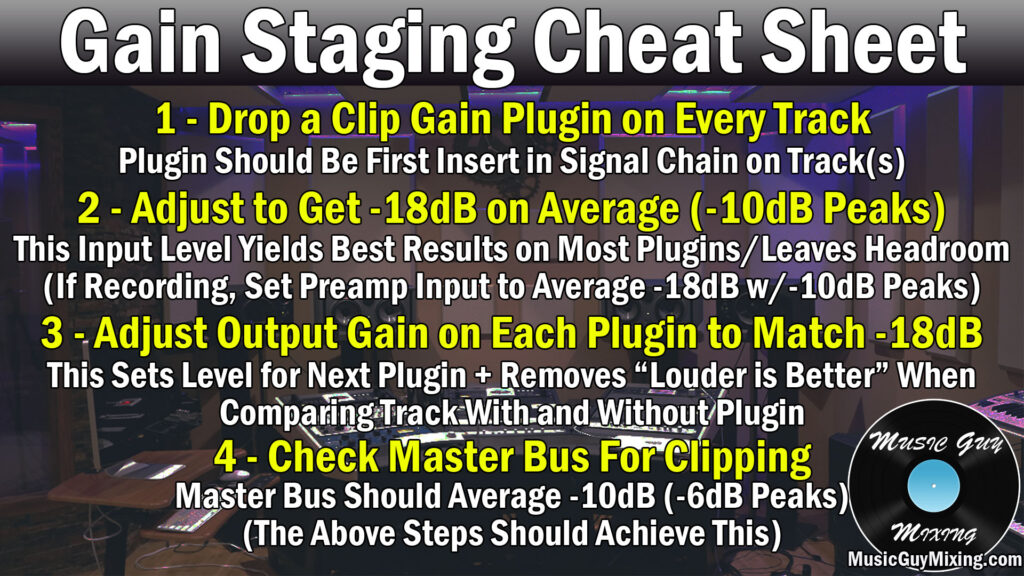
If gain staging wasn’t considered when setting the levels during the recorded stage, it’s likely that your clips are too quiet or worse too “hot”, coming close to the point of clipping. This leaves you little to no room to apply much to any processing to that audio later on.
Aside from that, adjusting clip gain allows us to bring one-off clips which were recorded much louder than other parts of the performance to be more commensurate with the rest of the clips on that track.
This is important when considering types of processing like compression which has a threshold on it whose behavior is guided by the input level of the audio.
Getting a clip more in line with other clips on that same track means that the threshold will work for every clip on that track.
How to Adjust Clip Gain
Adjusting clip gain is easy to do, and there’s a couple ways to do it, so let’s cover those now in case any or all of your clips could use less (or occasionally more) gain.
Which method you use will typically be based on how much of the performance or multiple clips on a track (when applicable) are drastically quieter or louder than our -18dB target.
If it’s consistently quiet or loud which is often the case, I like to simply drop a gain plugin at the start of the track’s processing chain.
In Ableton Live, you’ll find this under “Utilities” (see my complete overview on Ableton’s stock plugins):

The similarly named “Utility” is a kind of multi-purpose tool for panning, width adjustments, forcing mono, etc. but it also has a simple gain dial.
Simply turn this up or down as necessary to average that -18dB to instantly achieve a more responsible level across the entire track. Admittedly that -18dB is a rough target and, depending on how dynamic your audio is, it may be difficult to reach until you add a compressor to control that range.
Still, this does a lot of the heavy lifting in feeding a more ideal level into the next plugin in the chain (just remember to adjust the output gain on that plugin in case it raises or lowers the volume of that track).
In the case of a one-off (or two-off, etc.) clip which is decidedly quieter or louder than the rest of the performance, you can simply double click on the clip and adjust the gain like shown:
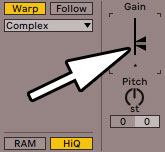
Again, I’m using Ableton Live as the example, but most DAWs are set up similarly in allowing you to make clip specific changes.
You’ll see the waveform of that clip of audio shrink or grow depending which way you adjust that slider, but this is the surgical approach when you have the rare clip which is a lot quieter or louder.
This saves you from having to move that clip to its own track and dialing in a custom threshold on your compressor to accommodate that track.
Now that you know the importance of adjusting clip gain in your mix and the reasoning behind it, you’ll no longer be punished for mistakes in the recording stage (at least with regards to gain!) and begin to enjoy better sounding finished mixes.