I’ve talked in the past how you can use snare reverb to add size to your snare without compromising control or muddying up the mix. Likewise, you can add kick reverb to the anchor of your drum kit and mix in the kick drum to add some sustain, depth, and even width to give this essential element of your mix the dominion it needs.
Let’s cover the best kick reverb plugin and settings to use to achieve a couple different distinct effects.
Best Kick Reverb
I like the sound of a plate reverb on the kick in particular because of its relatively clean tone. As I covered in my overview on what is plate reverb, this is an artificial reflection created by sending vibrations through a large sheet metal plate, and those sounds are captured with a microphone.
There are a lot of reverb plugins which are capable of and specialize in reproducing this effect on the tracks and instruments you apply them to.
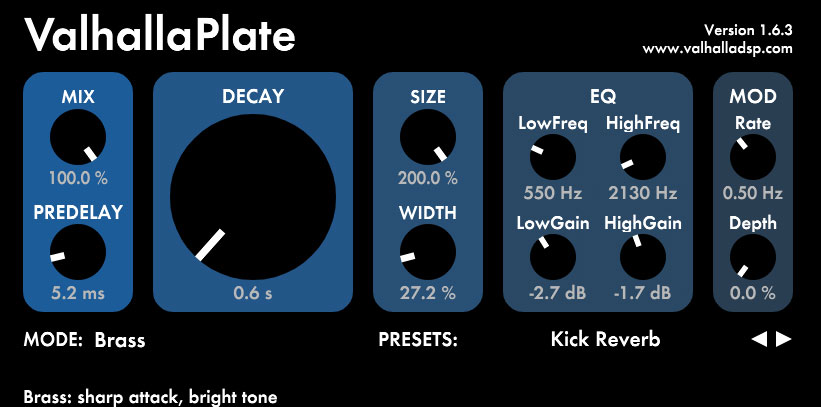
My go to plate reverb plugin is the ValhallaPlate owed in equal parts to the quality and adaptability of the sounds you can get from it:

With the “Mode” setting which acts as the style of the reverb, you can choose from a large variety of metals to flavor and shape the sound of the reflections.
Like virtually every reverb, it includes onboard filter settings which is very useful for high passing the kick reverb in particular to keep it out of the way of the low frequency body of the kick.
This keeps the most important part of the kick and arguably your mix in general clean, mono, and centered as it typically works best.
Speaking of the filter, let’s talk the rest of the best kick reverb settings to dial into your reverb, whichever one you use.
Kick Reverb Settings
Whether you’re using ValhallaPlate or a more standard reverb plugin, you’ll find most of these parameters on it, so here are the kick reverb settings I recommend using, beginning with predelay.
Predelay
Predelay on a reverb is the delay after the initial sound until you hear the sound of the reverb.
You always want some predelay as this keeps the clean sound of the instrument, in this case the kick, just that. This also helps to ensure the transient punch of the instrument is left intact.
In the case of a kick drum, this is that sound of the beater hitting the cover of the kick. That clicking sound draws the listener to the kick in the mix so that they pay attention to the rest of the sound. In other words, it keeps a kick drum present and visible in the mix.
We don’t want to smother that by syncing the kick reverb with the kick itself, so the predelay adds the space we need. We can also add a low pass filter to ensure the reverb’s frequency doesn’t extend to the frequency that clicking sound rings at, but we’ll talk about that in a moment.
On top of everything else, predelay is used to simulate the size of the room you’re hearing the reflection in. A larger room will naturally have longer time before you hear the reflection and conversely a smaller room will allow you to hear the reflection sooner.
We can adjust this to be in lockstep with the actual length of the decay itself, so it’s best to set these together.
I’ve mentioned this before when talking the best reverb settings, but you can input your song’s BPM into this calculator to find the ideal predelay for your reverb. It gives you the exact time in milliseconds, you simply choose if you want the reverb to last a quarter note/beat, a half note/2 beats, a full bar/4 beats, etc.
I generally recommend a quarter or half note, but let’s talk about that as we talk about the aforementioned length of the decay.
Time/Size/Decay
Your reverb plugin may refer to this as a number of different terms – size, decay, time, length, etc.
Whatever it’s referred to as, this is the amount of time the reverb lasts, its tail fading out, before you can’t hear it anymore.
The calculator I just linked to gives you both the ideal predelay and decay time both in milliseconds based on your song’s BPM.
Again, it’s just about choosing the time length relative to that BPM in terms of a quarter note/beat, a half note/2 beats, a full bar/4 beats, etc.
With kick reverb, I generally like to keep this at a quarter note as this typically ensures the reverb’s decay length/time is short enough so that it will end before we hear the next kick trigger, keeping that next kick clean.
I’m generally using kick reverb to add a little size and thickness to the kick and draw more attention to it while wanting to keep it clean, and a quarter note is typically a good way of doing this.
That way, even if you’ve got a kick on every beat in standard 4/4 time, the reverb is just tailing off as the next kick hits on each beat.
You can get away with a half note or even longer decay on more simplified and open performances; a lot of it depends on the nature of the performance and specifically that of the kick itself.
You’ll note that some reverb plugins give you more granular control over the time; in the case of ValhallaPlate it’s worth mentioning you can only set this to tenths of a second so just set it to the nearest tenth and round down.
Width
As a general rule, you want to keep your kick centered and narrow in your mix, but a bit of width by way of the kick reverb/reflection can help it fill out the space more which some mixes may call for.
Again, the width is exclusively applying to the reverb version of the kick rather than the kick itself, so we can get away with a bit more here.
I would still be wary about extending the width to the sides of the mix, but setting this around the 25% mark can add a little fullness to the kick in a way which enhances it in the mix.
Filters
I talked about the high pass filter earlier for preserving the openness of the lower end of the kick and mix in general where the body or meat of the kick resides.
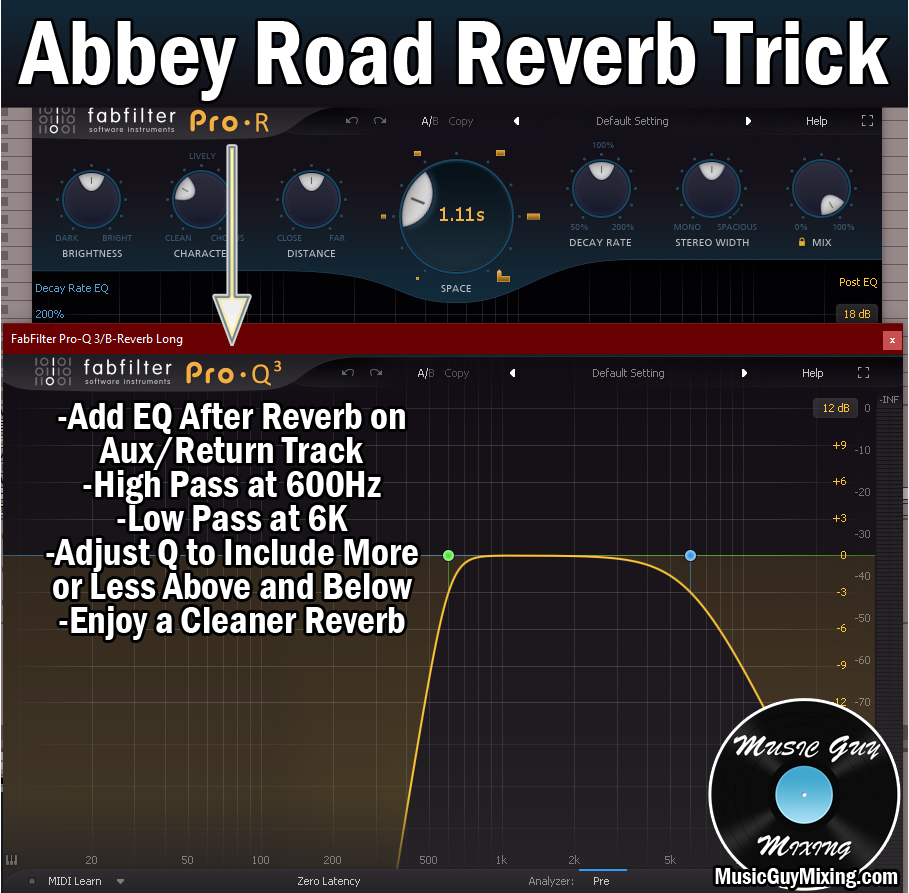
The Abbey Road Reverb Trick applies nicely here to preserve the low end in keeping the kick reverb out of the way of everything below 600Hz.
This trick recommends low passing on the higher end around 6k, but if you really want to preserve your kick’s “clicky” transient punch which typically rings around 3.5k, you might aim for around 2k for the low end filter.
So 600Hz and 2000Hz for your high and low pass filters on kick reverb, respectively, to get a nice clean and problem free reverb.
Other Settings
With all of the typical parameters addressed, it’s worth conceding than most reverb plugins feature additional parameters for coloring the sound of the reverb, albeit with a variety of different names.
However your reverb of choice presents these settings, I like to generally keep the kick reverb relatively clean and up front.
This typically matches the shorter decay which I opt for on kick reverb better than a darker tone as shorter decays naturally have more higher frequency characteristics to them (versus a longer decay which is darker in tone by virtue of lower frequencies being able to travel farther/longer).
In terms of ValhallaPlate, I like using Brass for the plate itself for its relatively brighter tone.
Mix
Assuming you’re using your kick reverb on an Aux/Return track then blending in the amount of reverb you want via your kick’s send dial, set the Mix/Wet/Dry percentage to 100% wet. This ensures that the send dial on any tracks you’re using this effect on, kick or otherwise, will exclusively feed in the sound of the reverb.
Gated Reverb on Kick Drum
Note that you can also apply gated reverb to your kick. This gives you kick a ton of size when it triggers, then immediately cuts off once that next kick triggers.
This is more of an interesting aesthetic effect you might call on from time to time when the song calls for it rather than an everyday use of reverb.
I put together a complete but brief tutorial on how to use gated reverb on drums.

The process is simple enough, you basically attach a gate to the reverb, following it in the processing chain on an Aux/Return track.
You then sidechain the gate to the kick itself so that it only opens when the kick is loud enough, IE triggering/playing.
When the gate is no longer getting any signal from the kick, it immediately closes, and the reverb effectively mutes.

The result makes your kick sound huge (depending on the settings you dialed in on the reverb) for the few hundred milliseconds it’s triggering without stepping on the next note or really any other aspect of your mix. It’s a very restrained way to get a lot of controlled size on any track in your mix, but it’s most commonly applied to the drums.
Whether you’re using the kick reverb for a more practical addition of a bit of size or a more aesthetic effect like a huge but controlled gated reverb, try these tips for blending in a little controlled size on your kick in your next mix without sacrificing any of its existing sound.