I’ve long talked about using two space-based effects in delay and reverb as Aux/Return sends in your mix. This allows you to save processing power in your mix and more importantly create a sense of cohesion by having a number of tracks sharing the same delay or reverb, giving them the sense they were recorded/are being heard in the same space even when they weren’t.
Something which some people mixing their own music are afraid to do is send one Aux/Return track/effect(s) into another. One of the most common examples of this is sending delay into reverb, so let’s talk about the effect this has on both the delay and reverb in your mix, not to mention why you might want to do it.
Delay Into Reverb
How to Send Delay Into Reverb
To blend in some reverb with your delay, you would use the send dials just like sending any other effect to your audio.
The only difference in this case is the track we’re sending the reverb to happens to be an existing effect rather than audio.
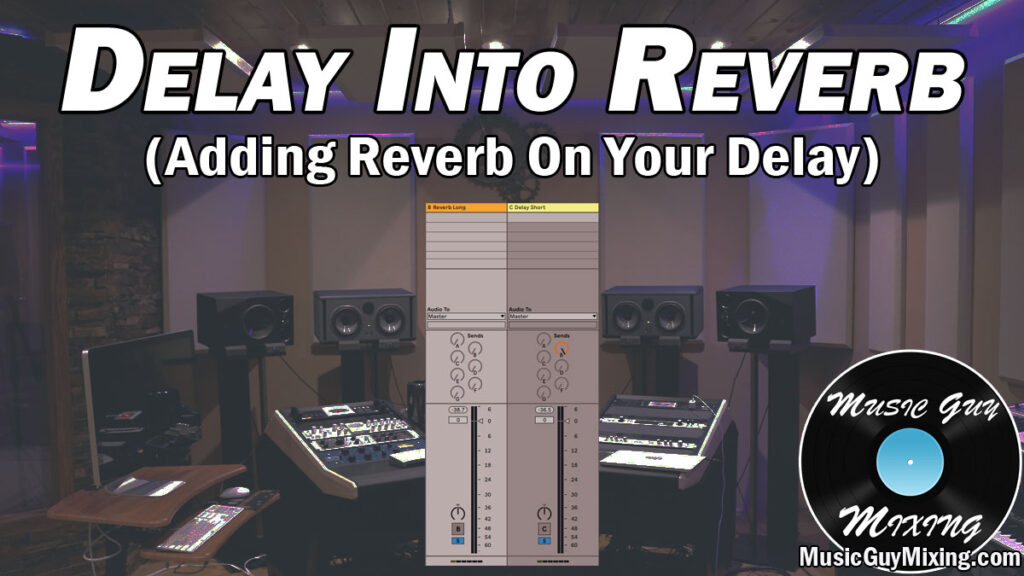
In the above image, I’ve got two of my Aux/Return (return being the term in my DAW, Ableton Live) effects tracks singled out and labeled.
The first track is a reverb, labeled “Reverb Long” because I’ve got another reverb on a different Aux/Return track (not pictured) which has a shorter, sub 1 second decay time.
For what it’s worth, my reverb long reverb Aux/Return track’s decay for this mix is around 1.5 seconds.
Regardless, to send that delay into the reverb, you’d simply turn up the send dial ON THE DELAY Aux/Return track to taste.
Because my Reverb is Return track B and my Delay is Return track C, I’m turning up the send dial/knob for B on that Delay Return track (C).
When playing back audio which is receiving that delay via its respective send dial/knob, you can audition the amount/influence of that reverb on that delay.
When you’re sending one effect into another in this way, this is a bit more subtle than the conventional sending an effect to existing audio. This is because we’ll obviously only hear the now reverb treated delay IF we’ve got that delay Aux/Return track being sent to a track with audio in our mix.
I generally like to send Aux/Return tracks to other Aux/Return tracks as one of the final steps in my mix in general AFTER I’ve sent that effect to all the audio tracks I want and set their send levels to taste.
This is because, if you decide you want more of that delay (in this case) on certain tracks later on, your blend amount of delay into the reverb will be off.
Reasons to Send Delay into Reverb
Sending your delay into your reverb gives your delay some welcome depth and an added dimension which you can’t get from the delay alone sometimes. It can also add some increased sustain on the backend.
The reverb also colors your delay to give it more of a sense that the reflections caused by that delay are coming from an actual space.
You can obviously play with the settings on that reverb to give that delay more width, make it sound like it’s coming from a closer or farther location, etc.
Some people like to create a specific reverb JUST for blending into their delay rather than using it as an insert on that delay, meaning they’re not even using that reverb as a send to actual audio.
Of course you can still use that reverb Aux/Return track to send and blend in with individual tracks in your mix on its own on top of blending it into the delay Aux/Return track.
If anything, this increased use of the same reverb Aux/Return track/effect creates even more cohesion amongst your audio. This in turn helps to give your entire mix a more natural (and better) sound.
While sending delay into reverb is one of the more common instances of sending on Aux/Return track into another, it’s not the only one.
You can alternatively send your reverb into your delay, as well, but as I recently covered, it’s generally better to ensure the longer effect is the latter one.
If you’ve got a short reverb and long delay, try sending the reverb into the delay.
In this scenario the situation was reversed, obviously, hence the delay into reverb, but don’t be afraid to experiment and blend even just a taste of one effect into another to get some unexpected and sometimes very welcome results.