Saturation is a useful tool when it comes to warming up your audio and this extends to the acoustic guitar. Let’s talk how to use acoustic guitar saturation to supplement or fill out the low mids of your acoustic.
Acoustic Guitar Saturation

If you’re not familiar, saturation is an effect which distorts wave forms and creates harmonics. While there are multiband saturation plugins like FabFilter’s Saturn which can exclusively target certain frequency bands, I like a plugin like Decapitator from Soundtoys (I called it the best saturator plugin) which gives you more of that classic warm sound that you associate with saturation:

Part of the appeal is the simplicity of the interface; you have style buttons which can slightly change the color of the saturation but aside from your filter and tone dials it’s just about the drive/distortion you’re adding.
My go to setting for acoustic guitar saturation via this plugin is the same which I apply to electric guitar.
I like the “N” style button which channels the Neve 1057 Preamp and works beautifully on guitar both electric and acoustic (see my guide on Decapitator style buttons).
From there it’s just about dialing in the amount of drive that you want. The more drive, the fuller and warmer your acoustic guitar’s tone will become:

The filters and tone dials are completely to taste in this case. In the above image, I’ve got the high cut much lower with a view to taming the harshness associated with electric guitar distortion so you’ll likely want to set this much higher.
Assuming you’re preceding this with acoustic guitar EQ, you likely already low passed your acoustic so you don’t need to worry about the filter controls.
If your acoustic is a bit top heavy and thin, you might try favoring slightly left on the “Tone” setting to favor the darker side.
This will really depend on your acoustic guitar’s recorded sound and what you’re trying to accomplish. If the microphone favored the neck a bit too much or the guitarist wasn’t in a stationary position relative to the mic and thus resulted in a thinner sound, you may want to nudge the sound a bit lower heavy via that dial in addition to a max drive setting.
I referenced Saturn earlier; this plugin allows you to create and isolate up to 6 different bands.
If you are getting artifacts you don’t want from whatever saturation plugin you’re using at higher frequencies, this can be a nice solution.
I dialed in a bit of drive between roughly 100Hz and 500Hz to thicken and warm up this range on an acoustic which was a little thin here:

The surrounding bands are untouched while the fundamental frequency of the body of the acoustic guitar feels a bit beefier by way of that saturation.
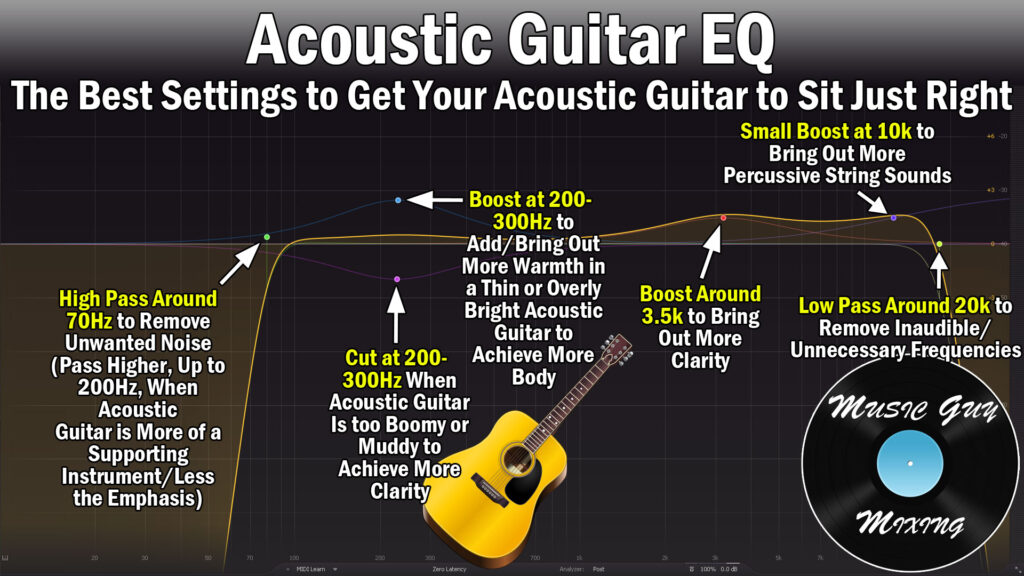
Check out my recent guide on how to improve acoustic guitar sound in the mix through EQ, compression, panning, even some recording tips and tricks for getting that fuller sound so that you hopefully won’t even need any acoustic guitar saturation.