
Warm vocals are rich in and emphasize that low-mid frequency range. If your vocal is lacking in warmth, consider this quick overview on how to make vocals sound warmer.
How to Make Vocals Sound Warmer

EQ is a good place to start in how to make vocals sound warmer. Not only is this a relatively easy way to bring out the warmth that’s already there, EQ is typically one of the first types of processing you should use (see my vocal chain for the complete routing).
EQ
Try these warm vocal EQ settings to both bring out more warmth or shift the frequency profile of your vocal to more of a warmer balance:
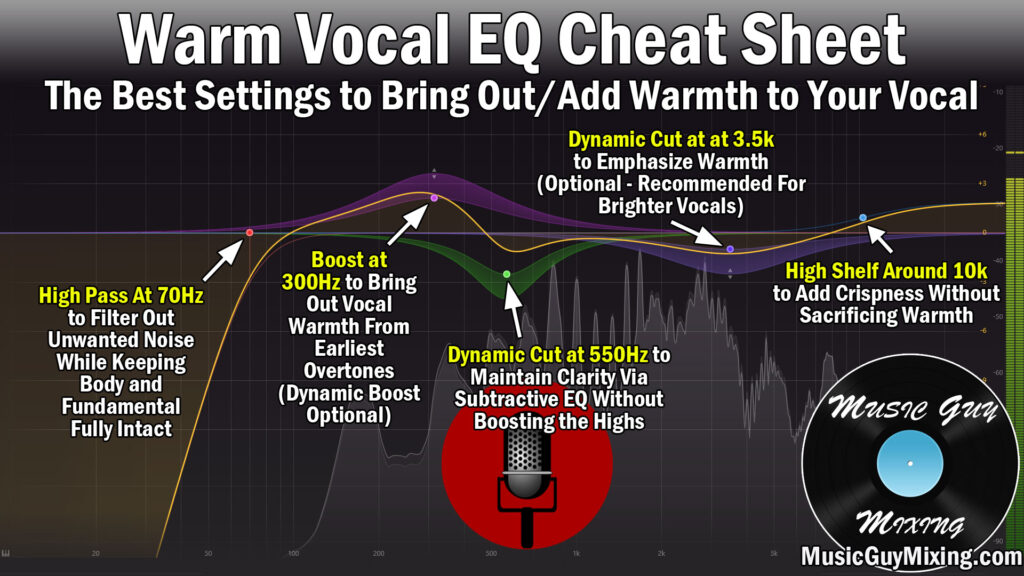
The main factors at play with warm vocal EQ are boosting that body and early overtone range around 300Hz or so while controlling the higher frequencies which can make the vocal seem thinner when left unchecked.
Dynamic EQ adjustments on these bands in place of a conventional static move can be useful to keep your adjustments relative to what the vocal is doing from note to note, as well.
As I’ve alluded to, EQ isn’t just for sculpting your audio but it’s just as importantly for shifting the entire frequency profile of your vocal. If you have an inherently brighter vocal typically due to the microphone used (see my recommendations on the best vocal microphones) or if the singer wasn’t adequately close enough to the microphone, a dynamic cut around 3.5kHz can help control the brightness.
This actually puts more of the emphasis back on the body and warmth of the vocal which, incidentally, is the foundation of subtractive EQ.
The same practice is at work with the recommended 550Hz or so dynamic cut to create a little clarity by cleaning up some of the mud which doesn’t contribute to the warmth.
We can help to add a little sizzle and keep that vocal up front by emphasizing the transient punch on the vocal’s delivery of consonants with a high shelf around 10kHz.
Saturation
Another method for how to make vocals sound warmer which I’ve covered in the past is to add saturation to your vocal.
I cite this as the preferred method over EQ when your vocal doesn’t have much warmth or frequency information in that 300-500Hz region to begin with, typically due to the aforementioned microphone choice or vocalist’s spot relative to the microphone.
Whenever I get sent vocals which need some warmth, my second stop is dropping Decapitator on them and dialing these settings:

Set the style to “T” (or experiment – it’s simply my go to on vocals) and turn up the drive to taste to beef up that low end and instantly hear that warmth and thickness you’re after.
Adjust the tone knob to taste to push the vocal a little darker leaning for more of an emphasis or shift of the sound profile to the warmer end of the pool, as well.
Vocal Layering
Aside from controlling frequencies or adding saturation, a reliable way for how to make vocals sound warmer in your mix is through vocal layering.
This creates a natural warmth by way of adding to the fullness of the vocal.
If you’ve got double tracked vocals, check out my guide on how to mix double tracked vocals in order to create the vocal warmth you’re looking for.
While there’s no equivalent to double tracking your vocals in terms of quality, if you didn’t double track the vocals at the time or have access to doubles, there are workarounds to create a similar effect.
One option is to work with unused stems if you’ve got them, putting them on their own track and dropping them 20dB beneath the lead vocal until you can feel them more than hear them, adding to the warmth and fullness in that lower-mid range.
Chorus vocals are especially easy to “create” doubles for because it’s typically the exact same lyrics and notes each time. This means you have three unique sets of the same vocal, allowing you to copy and paste the other two chorus takes for each section, dropping them both 20dB and panning them hard left and right.
You can also use a vocal doubler effect or similar effect like a delay plugin set to a quick, sub 40ms delay time, adjusting the wet/dry balance to barely feel it in the mix.

Not exactly a doubling plugin, above pictured is a plugin I like to keep on as an Aux/Return track in Little Microshift from Soundtoys in virtually every mix I do for thickening out vocal and other tracks on demand via their send dials.
EQ, saturation, and vocal layering like outlined above are all techniques used by the pros which you can in turn use for how to make vocals sound warmer, so give them a go to bring home the warmth in your next mix.
